
What changed: the screenshots are now our own iPhone 17e on iOS 27.0.1, dark mode, and the wording is checked against those screens and Apple's iOS 27 guide.
howtosimply.com/guides/how-to-record-video-sound-in-stereo-or-mono-on-an-iphone/ · Checked October 2026 · iPhone 17e · iOS 27.0.1
In this guide
Open Settings, tap Camera, then Record Sound, and tap Stereo or Mono. iPhone 16 and later can also record Spatial Audio, which is then a third choice on the same page.
5 of 5 steps with real screenshots · 3 official sources below
- Device
- iPhone
- Shown on
- iOS 27.0.1 (iPhone 17e)
- App
- Settings
- Path
- Settings › Camera › Record Sound
- Real screenshots
- 5 of 5 steps
- Checked
- October 2026
- Sources
- 3 official, linked below
Step by step
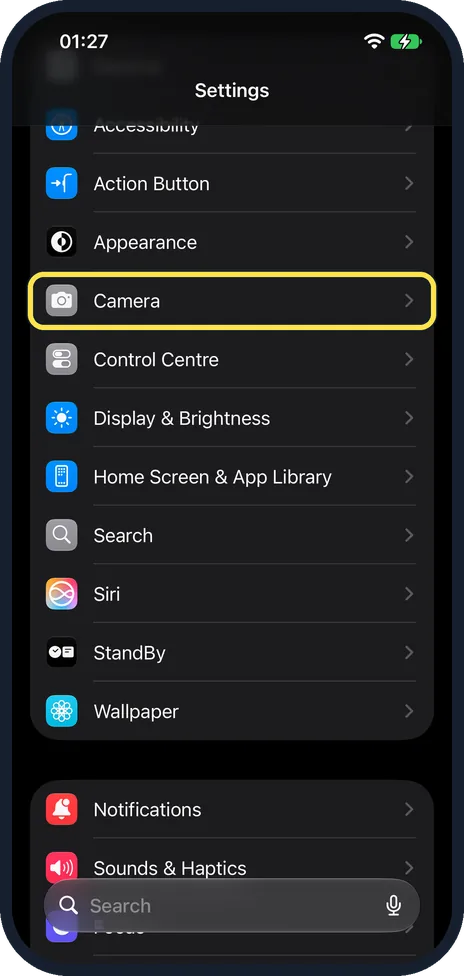
Open Settings and tap Camera
Tap Camera. On our iPhone 17e it is between Appearance and Control Centre.
Watch these steps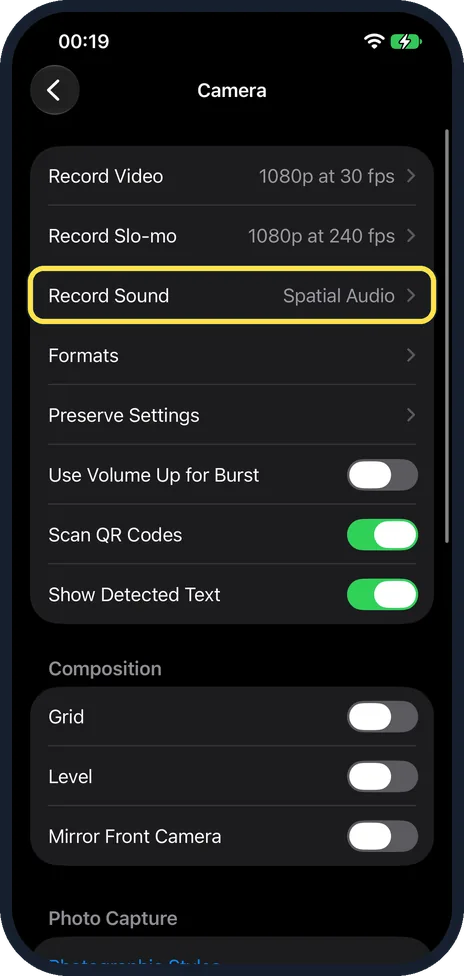
Tap Record Sound
The row shows the current setting at the right. It is the third row, below Record Video and Record Slo-mo. On our iPhone 17e it said Spatial Audio. Apple says iPhone 16 models or later record in Spatial Audio by default.
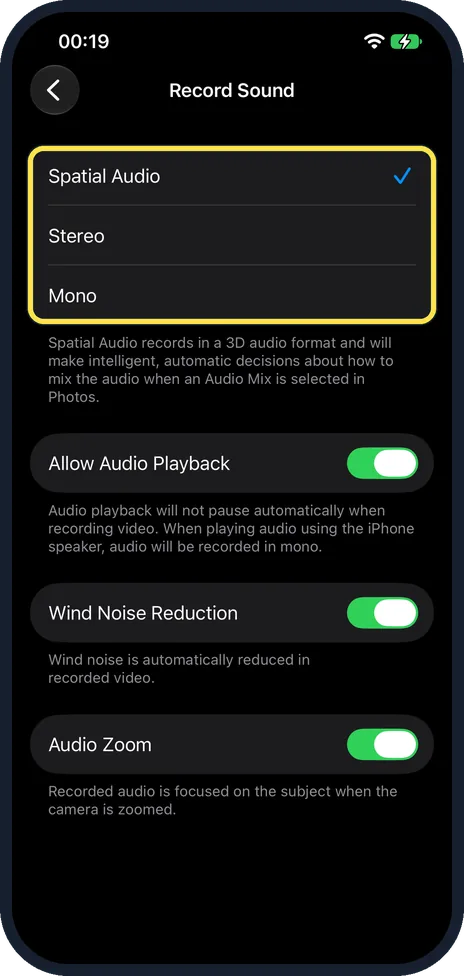
Tap Spatial Audio, Stereo or Mono
The tick shows the active one. Our iPhone 17e offers Spatial Audio, Stereo and Mono, with Spatial Audio ticked. The note below reads: "Spatial Audio records in a 3D audio format and will make intelligent, automatic decisions about how to mix the audio when an Audio Mix is selected in Photos." Apple says earlier iPhone models record in Stereo.
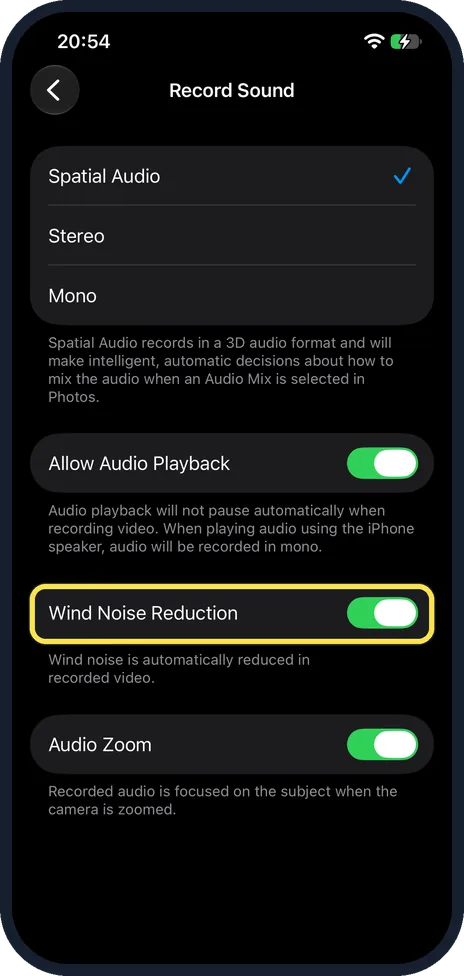
iPhone 16 and later: Wind Noise Reduction
It is on the same Record Sound page, below Allow Audio Playback. On our iPhone 17e it was on, with the note: "Wind noise is automatically reduced in recorded video."
Apple says the reduction applies when you record with Spatial Audio or Stereo.
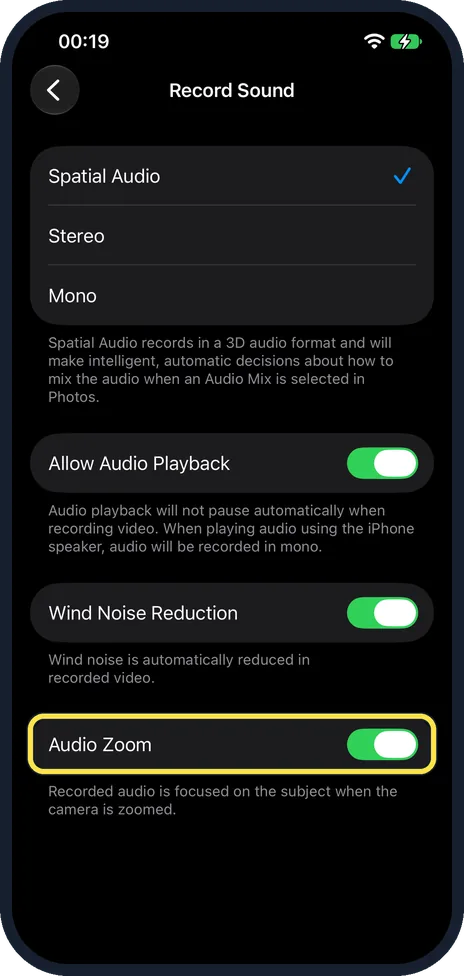
Decide about Audio Zoom
Audio Zoom is the last switch on the same Record Sound page. On our iPhone 17e it was on, with the note: "Recorded audio is focused on the subject when the camera is zoomed." Apple's iPhone User Guide does not describe Audio Zoom, so that on-screen note is all we have.
What changed: the screenshots are now our own iPhone 17e on iOS 27.0.1, dark mode, and the wording is checked against those screens and Apple's iOS 27 guide.
Watch these steps
If you do not see this option
- No Spatial Audio choice Apple says iPhone 16 or later records video in Spatial Audio, and earlier iPhone models record in Stereo. Apple's page on video recording settings also mentions a Record Stereo Sound switch under Settings, Camera, which you turn off to stop stereo recording. Apple does not say which iPhones show it. Our iPhone 17e shows the Record Sound page instead. Source: Change sound recording options on iPhone · Source: Change video recording settings on iPhone · Source: Trim video length, adjust speed, and edit audio on iPhone
- No Wind Noise Reduction switch Apple describes the switch for iPhone 16 or later. On our iPhone 17e it sits below Allow Audio Playback. Source: Change sound recording options on iPhone · Source: Change video recording settings on iPhone · Source: Trim video length, adjust speed, and edit audio on iPhone
If this does not work
- The video sounds mono with Stereo or Spatial Audio ticked If music or other audio was playing through the iPhone speaker, that is expected. The note under Allow Audio Playback on our iPhone 17e says audio will then be recorded in mono.
- Wind is still loud in the video Check that Wind Noise Reduction is on. Apple says that on iPhone 16 or later wind noise is reduced automatically when you record with Spatial Audio or Stereo. It does not say this for Mono. Source: Change sound recording options on iPhone · Source: Change video recording settings on iPhone · Source: Trim video length, adjust speed, and edit audio on iPhone
- There is no Audio Mix option in Photos Apple says Audio Mix in the Photos app works on videos recorded with Spatial Audio, on supported models. A video recorded in Stereo or Mono will not have it. Set Record Sound back to Spatial Audio for the next video. Source: Change sound recording options on iPhone · Source: Change video recording settings on iPhone · Source: Trim video length, adjust speed, and edit audio on iPhone
About this guide
Apple describes the three choices by how they play back. Spatial Audio is immersive from all directions on supported playback devices. Stereo is separated between the left and right ear. Mono is the same in both ears. Apple says that when you record a video with Spatial Audio, you can edit its sound with Audio Mix in the Photos app, on supported models. Apple lists the Audio Mix choices as Standard, In-Frame, Studio and Cinematic. A Stereo or Mono video does not get Audio Mix. If a video is going into an editing program or onto a device that expects ordinary sound, stereo or mono can be the simpler choice.
Screenshots: iPhone 17e, iOS 27.0.1, dark mode.
Good to know
Music stopping when you start to film is a different switch on this page: how to keep music playing while recording video on an iPhone.
Resolution and frame rate are set under Record Video, at the top of the Camera page: how to change the video resolution and frame rate on an iPhone.
In short: Settings, Camera, Record Sound, tap Stereo, Mono or, on iPhone 16 and later, Spatial Audio.
- Apple iPhone User Guide: Change sound recording options on iPhone
- Apple iPhone User Guide: Change video recording settings on iPhone
- Apple iPhone User Guide: Trim video length, adjust speed, and edit audio on iPhone
Links checked in October 2026. Menus and features can change after software updates. These steps match the version named at the top.
Did this guide work for you?
Sorry about that. What happened?