
What changed: the screenshots are now our own iPhone 17e on iOS 27.0.1, dark mode, and the wording is checked against those screens.
howtosimply.com/guides/how-to-keep-music-playing-while-recording-video-on-an-iphone/ · Checked October 2026 · iPhone 17e · iOS 27.0.1
In this guide
Open Settings, tap Camera, then Record Sound, and switch on Allow Audio Playback. Music or a podcast then does not pause by itself when you start recording video. The page adds one limit: audio played through the iPhone speaker is recorded in mono.
3 of 3 steps with real screenshots · 1 official source below
- Device
- iPhone
- Shown on
- iOS 27.0.1 (iPhone 17e)
- App
- Settings
- Path
- Settings › Camera › Record Sound
- Real screenshots
- 3 of 3 steps
- Checked
- October 2026
- Sources
- 1 official, linked below
Step by step
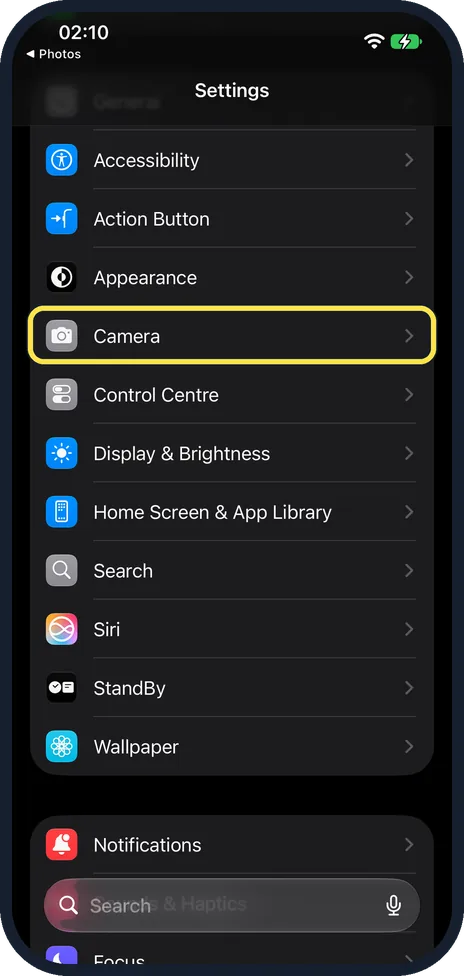
Open Settings and tap Camera
Camera is in the group that starts with General, a few rows below it.
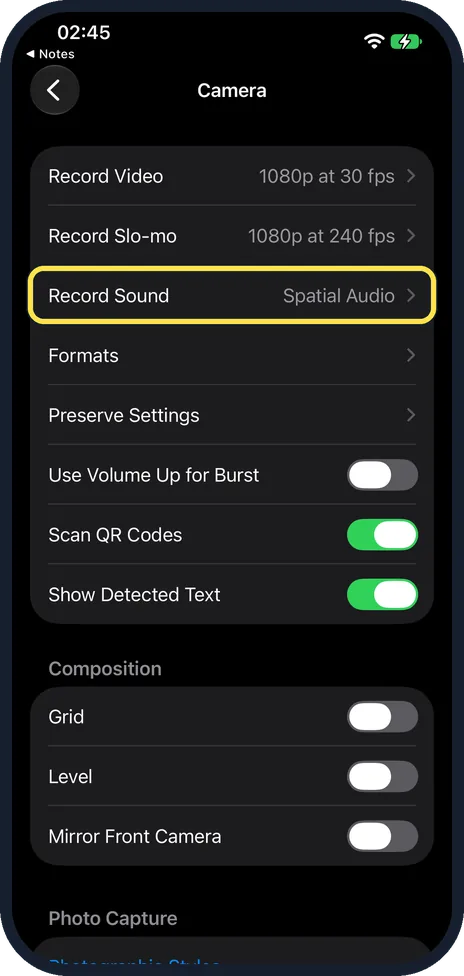
Tap Record Sound
It is near the top of the Camera page, below Record Slo-mo. The row shows the current sound format, here Spatial Audio.
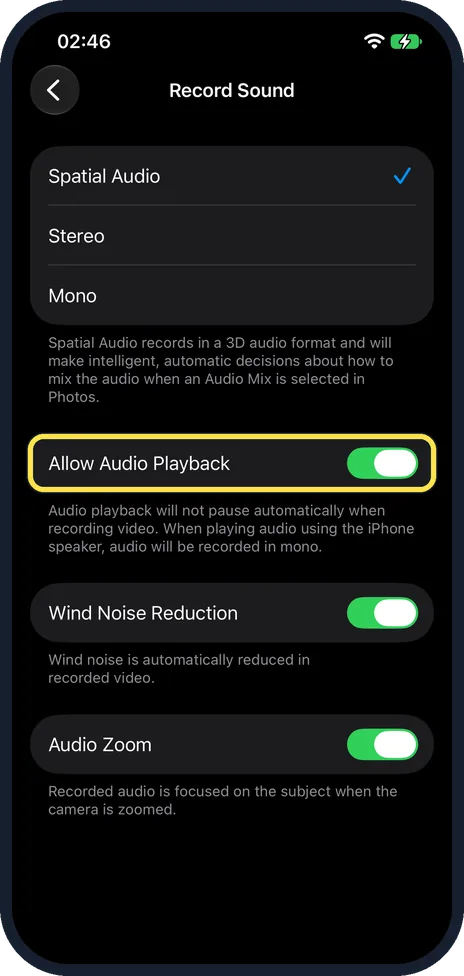
Switch on Allow Audio Playback
The note below the switch says: audio playback will not pause automatically when recording video. When playing audio using the iPhone speaker, audio will be recorded in mono.
What changed: the screenshots are now our own iPhone 17e on iOS 27.0.1, dark mode, and the wording is checked against those screens.
If you do not see this option
- You have an iPhone 15 or older. Apple says iPhone 16 and later record video with Spatial Audio, and earlier models record in Stereo, so the list at the top of the page differs. Ours showed Spatial Audio, Stereo and Mono. Source: Change sound recording options on iPhone
- Search for it. Open Settings, tap the search field at the bottom and type Record Sound. Apple notes that the sections in Settings depend on the iPhone model. Source: Find settings on iPhone
If this does not work
- The music sounds flat in the video. The note under the switch says audio played through the iPhone speaker is recorded in mono.
- Wind noise sounds different. Wind Noise Reduction, below on the same page, was on on ours. Apple says it works on iPhone 16 or later when you record with Spatial Audio or Stereo. Source: Change sound recording options on iPhone
About this guide
Whether music stops when you press record depends on one switch in the camera settings. On our iPhone 17e with iOS 27.0.1 it was on. If your music still pauses, this is the place to look.
The screenshots are our own, taken on an iPhone 17e running iOS 27.0.1, in dark mode.
Good to know
To have music pause again when you film, switch Allow Audio Playback off.
The format of the recorded sound is set at the top of the same page: how to record video sound in stereo or mono on an iPhone.
In short: Settings, Camera, Record Sound, Allow Audio Playback on.
Links checked in October 2026. Menus and features can change after software updates. These steps match the version named at the top.
Did this guide work for you?
Sorry about that. What happened?