
What changed: the screenshots are now our own iPhone 17e on iOS 27.0.1, dark mode, and the wording is checked against those screens and Apple's iOS 27 guide.
howtosimply.com/guides/how-to-change-the-slow-motion-frame-rate-on-an-iphone/ · Checked October 2026 · iPhone 17e · iOS 27.0.1
In this guide
Open Settings, tap Camera, then Record Slo-mo, and tap 1080p HD at 120 fps or 1080p HD at 240 fps. At 240 fps, the default, a minute of slo-mo needs about 480 MB. At 120 fps it needs about 170 MB.
3 of 3 steps with real screenshots · 3 official sources below
- Device
- iPhone
- Shown on
- iOS 27.0.1 (iPhone 17e)
- App
- Settings
- Path
- Settings › Camera › Record Slo-mo
- Real screenshots
- 3 of 3 steps
- Checked
- October 2026
- Sources
- 3 official, linked below
Step by step
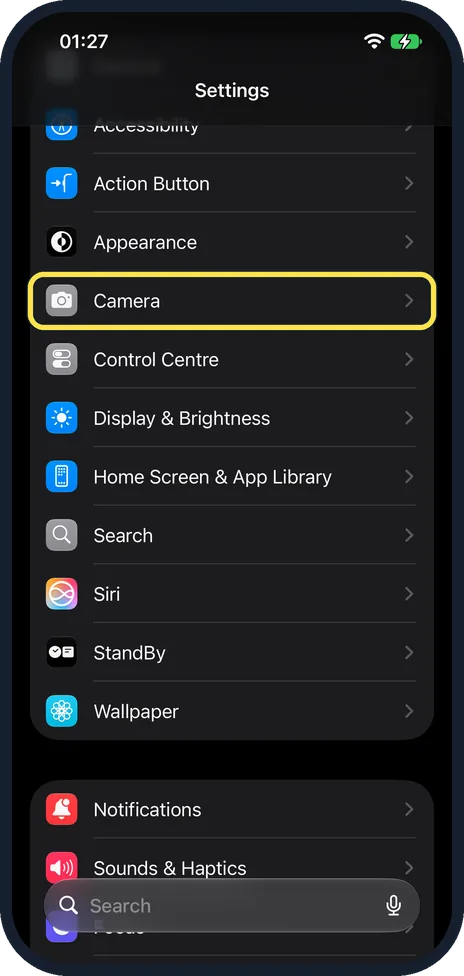
Open Settings and tap Camera
Tap Camera. It is between Appearance and Control Centre.
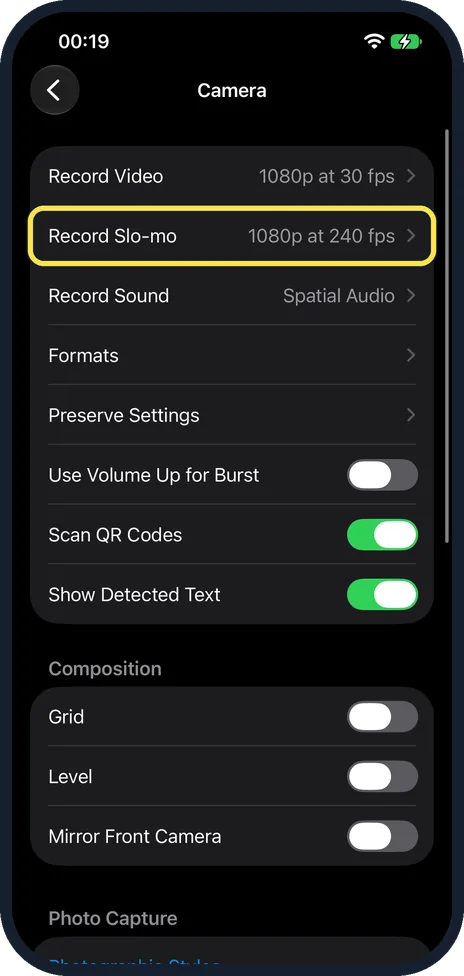
Tap Record Slo-mo
It is the second row, below Record Video. The row shows the current setting at the right. On our iPhone 17e it said 1080p at 240 fps.
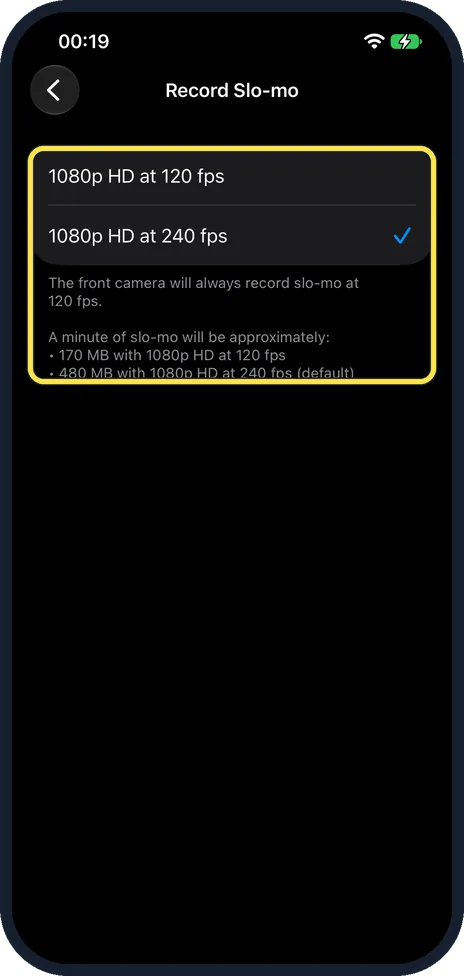
Tap the frame rate
There are two choices on our iPhone 17e: 1080p HD at 120 fps and 1080p HD at 240 fps. The tick shows the active one. On ours it was 240 fps. The note below the list says a minute of slo-mo is about 170 MB at 120 fps and about 480 MB at 240 fps, and that the front camera always records slo-mo at 120 fps.
What changed: the screenshots are now our own iPhone 17e on iOS 27.0.1, dark mode, and the wording is checked against those screens and Apple's iOS 27 guide.
If you do not see this option
- No 4K at 120 fps choice Apple's iOS 27 guide adds 4K at 120 fps from the back camera on supported models. Our iPhone 17e lists only the two 1080p HD choices. Source: Change video recording settings on iPhone
- No setting for the front camera There is none. Apple says the front camera records slo-mo at 1080 HD at 120 fps, and the note on the page says the front camera always records slo-mo at 120 fps. Source: Change video recording settings on iPhone
If this does not work
- 240 fps is missing or not used Seen on our iPhone 17e, not in Apple's guide: the note under Settings > Camera > Formats says 4K at 60 fps, 1080p at 240 fps and HDR video require High Efficiency. If Formats is set to Most Compatible, switch it back to High Efficiency.
About this guide
Slo-mo on the back camera is set to 1080p HD at 240 frames per second. That is also the setting with the larger files. Half the frame rate takes about a third of the storage.
On iOS 26 Apple gives the same path, Settings > Camera > Record Slo-mo, and does not mention a 4K at 120 fps choice. Screenshots: iPhone 17e, iOS 27.0.1, dark mode.
Good to know
Apple notes that on supported models Record Slo-mo also offers 4K at 120 fps from the back camera. Our iPhone 17e did not offer it.
You do not have to decide in advance which part plays slowly. Apple says that in the Photos app you open a video shot in Slo-mo mode, start editing it and drag the black vertical bars beneath the frame viewer to set where it plays in slow motion.
For normal video: how to change the video resolution and frame rate on an iPhone.
In short: Settings, Camera, Record Slo-mo, tap 120 or 240 fps.
- Apple iPhone User Guide: Change video recording settings on iPhone
- Apple iPhone User Guide: Change video recording settings on iPhone (iOS 26)
- Apple iPhone User Guide: Trim video length, adjust speed, and edit audio on iPhone
Links checked in October 2026. Menus and features can change after software updates. These steps match the version named at the top.
Did this guide work for you?
Sorry about that. What happened?