
What changed: the screenshots are now our own iPhone 17e on iOS 27.0.1, dark mode, and the wording is checked against those screens and Apple's iOS 27 guide.
howtosimply.com/guides/how-to-make-an-iphone-speak-words-as-you-type/ · Checked October 2026 · iPhone 17e · iOS 27.0.1
In this guide
Open Settings, tap Accessibility, then Keyboards & Typing, then Typing Feedback, and switch on Speak Words. The iPhone then speaks each whole word while you type. Speak Auto-text also speaks auto-corrections and auto-capitalisations.
7 of 7 steps with real screenshots · 3 official sources below
- Device
- iPhone
- Shown on
- iOS 27.0.1 (iPhone 17e)
- App
- Settings
- Path
- Settings › Accessibility › Keyboards & Typing › Typing Feedback
- Real screenshots
- 7 of 7 steps
- Checked
- October 2026
- Sources
- 3 official, linked below
Step by step
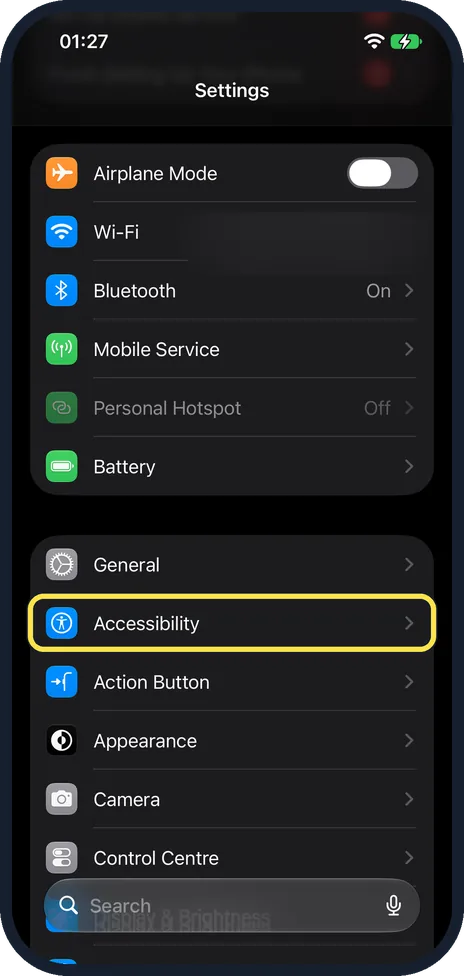
Open Settings and tap Accessibility
Scroll down a little and tap Accessibility, directly below General in the same group, or type Accessibility into the Search field at the bottom of the screen.
Watch these steps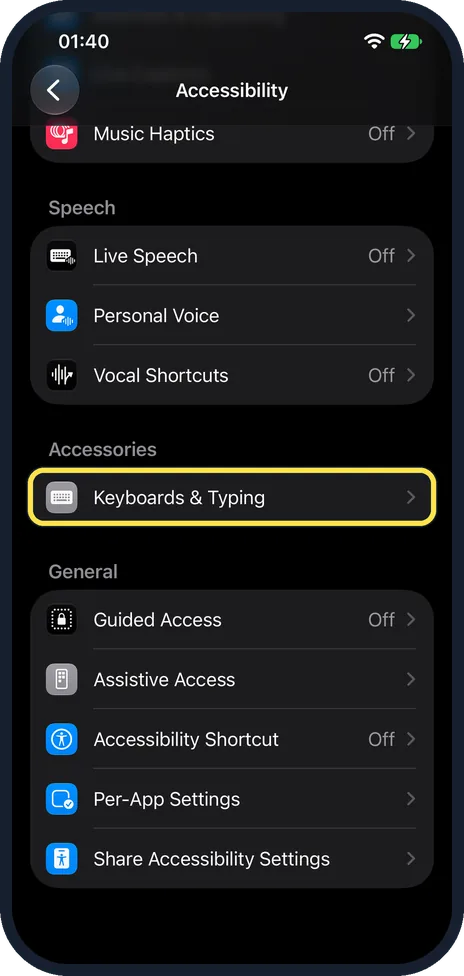
Scroll down and tap Keyboards & Typing
Scroll down the Accessibility page to find it. On our iPhone 17e it was the only row under Accessories, below the Speech group.
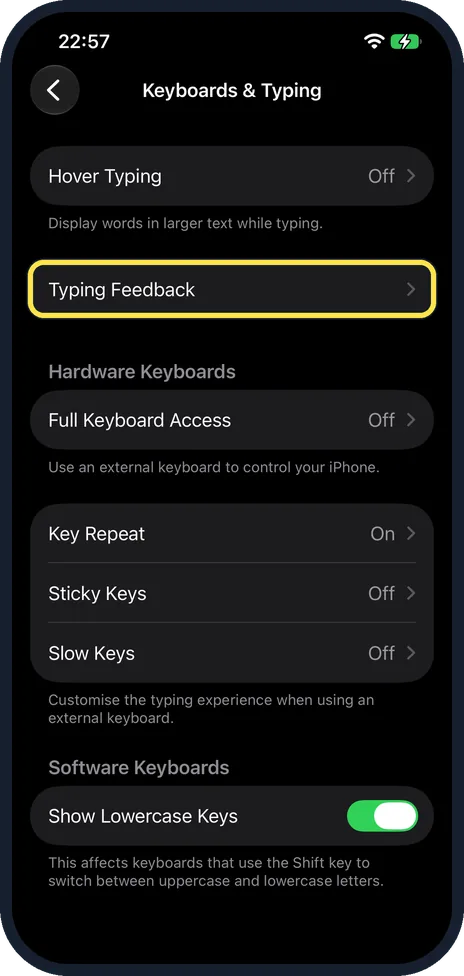
Tap Typing Feedback
It is the second row of the page, below Hover Typing.
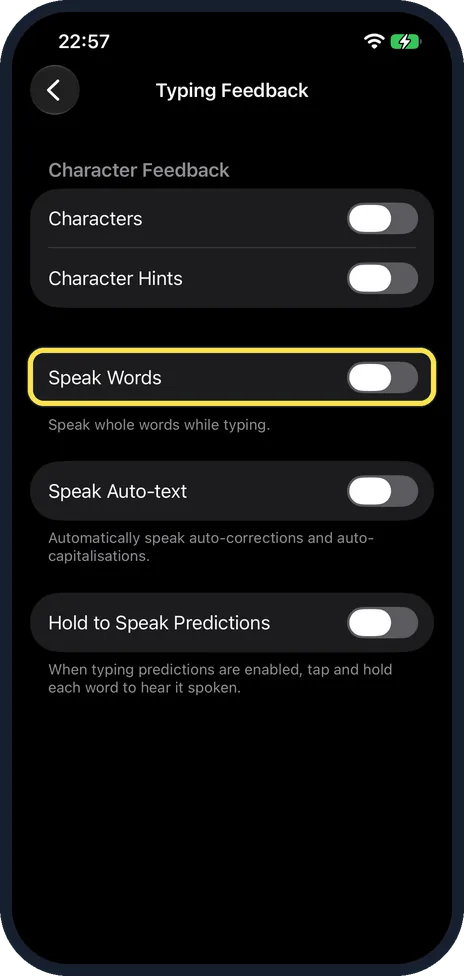
Switch on Speak Words
The note below says: speak whole words while typing. On our iPhone 17e it was off.
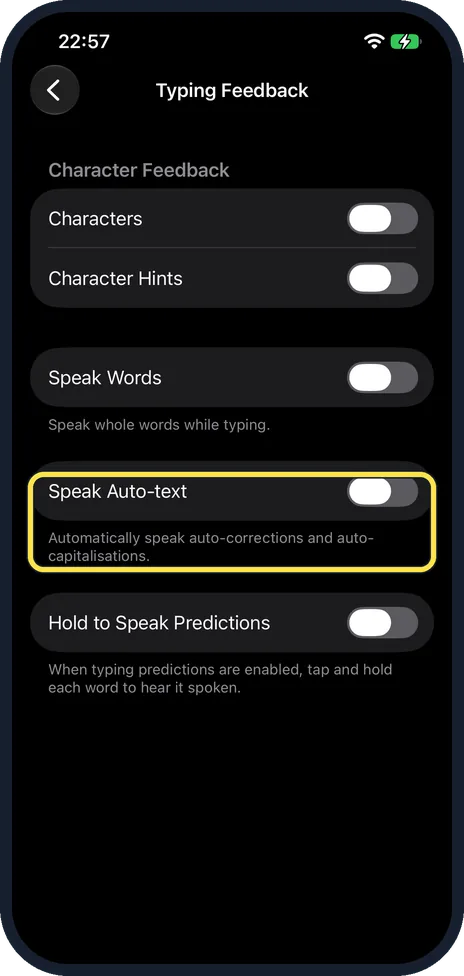
Switch on Speak Auto-text if you like
The iPhone then speaks auto-corrections and auto-capitalisations automatically, so you hear when it changes a word.
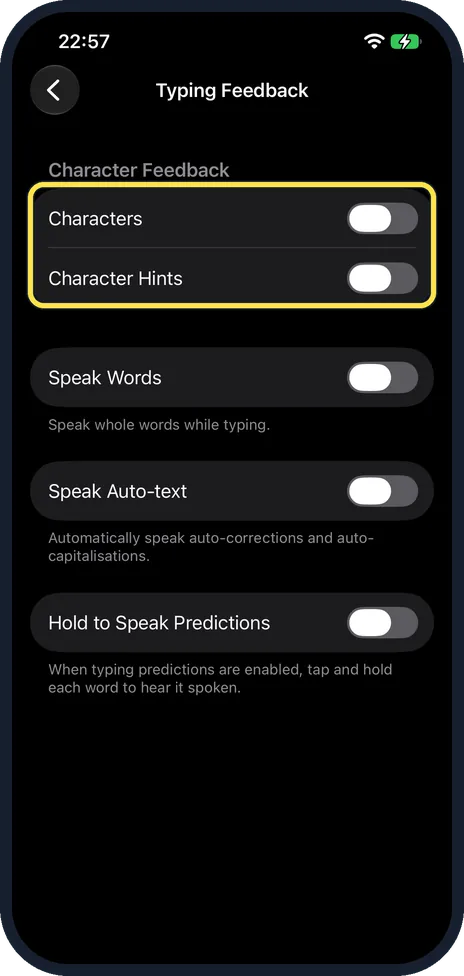
Decide about single letters
Characters makes the iPhone speak each letter as you type it. Character Hints adds the phonetic name of the letter. These two switches are at the top of the page, under the heading Character Feedback.
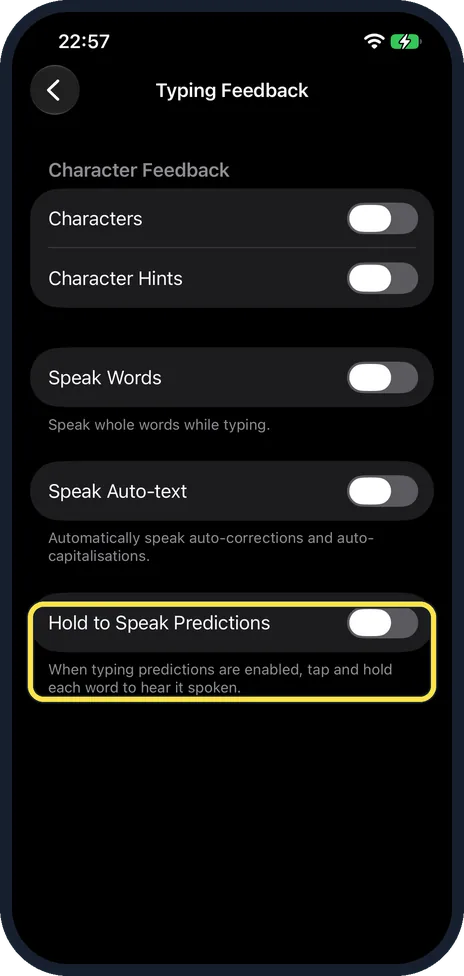
Hear the suggested words
With Hold to Speak Predictions on, and typing predictions enabled, you touch and hold a suggested word to hear it spoken. Typing predictions are the suggestions above the keyboard. Their switch is Predictive Text, in Settings, General, Keyboard, under All Keyboards.
What changed: the screenshots are now our own iPhone 17e on iOS 27.0.1, dark mode, and the wording is checked against those screens and Apple's iOS 27 guide.
Watch these steps
If you do not see this option
- You look under Spoken Content. Apple's Typing Feedback article puts it under Accessibility, Spoken Content, Typing Feedback. That is the layout of iOS 18 and earlier: Apple's iOS 26 and iOS 27 guides both call that page Read & Speak, and on our iPhone 17e with iOS 27.0.1 Typing Feedback is under Accessibility, Keyboards & Typing. Source: Use Typing Feedback on your iPhone, iPad, or iPod touch · Source: Hear iPhone speak the screen, selected text, and typing feedback
- You look under Read & Speak. On iOS 27, Read & Speak has the voice, speaking rate and Speak Screen settings. Typing Feedback has its own row on the Keyboards & Typing page, below Hover Typing. Source: Hear iPhone speak the screen, selected text, and typing feedback
If this does not work
- Hold to Speak Predictions does nothing. It needs typing predictions, the suggestions above the keyboard. Check that Predictive Text is on in Settings, General, Keyboard. Source: Use predictive text on iPhone
- The voice is hard to follow. Apple puts the voice and speaking rate for spoken content under Accessibility, Read & Speak. Change Voices or Speaking Rate there. Source: Hear iPhone speak the screen, selected text, and typing feedback
About this guide
Autocorrect changes words while your eyes are on the keys, and the mistake is noticed after the message is sent. With Typing Feedback the iPhone says aloud what it has just written, so you hear a wrong word at once. On our iPhone 17e all five switches were off.
Screenshots: iPhone 17e, iOS 27.0.1, dark mode.
Good to know
To see what you type in larger text instead of hearing it: how to see what you type in larger text on an iPhone.
In short: Settings, Accessibility, Keyboards & Typing, Typing Feedback, Speak Words on.
- Apple Support: Use Typing Feedback on your iPhone, iPad, or iPod touch
- Apple iPhone User Guide: Hear iPhone speak the screen, selected text, and typing feedback
- Apple iPhone User Guide: Use predictive text on iPhone
Links checked in October 2026. Menus and features can change after software updates. These steps match the version named at the top.
Did this guide work for you?
Sorry about that. What happened?