
howtosimply.com/guides/how-to-check-the-warranty-or-applecare-cover-of-an-iphone/ · Checked October 2026 · iPhone 14 Pro · iOS 27.0.1
In this guide
Open Settings, tap General and tap AppleCare & Warranty. Tap your iPhone to see whether it is covered and until when. For a phone you do not have in your hand, enter its serial number at checkcoverage.apple.com.
3 of 5 steps with real screenshots · 1 official source below
- Device
- iPhone
- Shown on
- iOS 27.0.1 (iPhone 14 Pro)
- App
- Settings
- Path
- Settings › General › AppleCare & Warranty
- Real screenshots
- 3 of 5 steps
- Checked
- October 2026
- Sources
- 1 official, linked below
Step by step
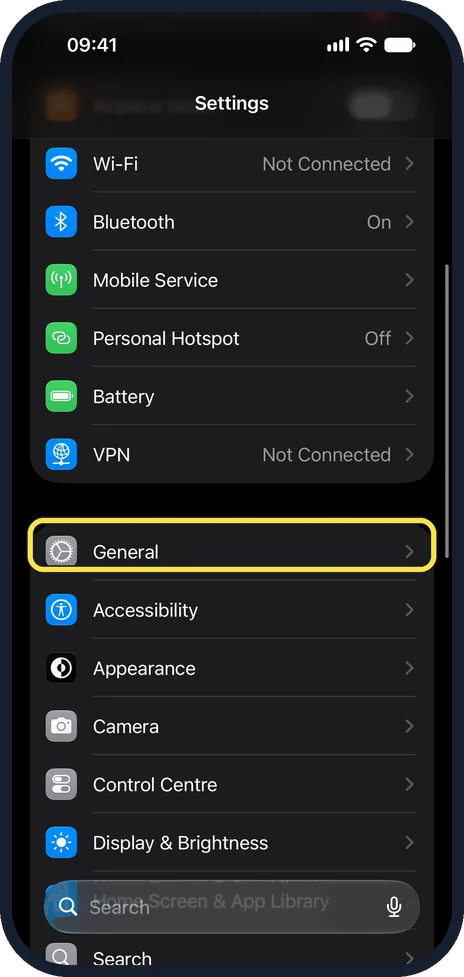
Open Settings and tap General
Scroll down past Wi-Fi, Bluetooth and Battery. General starts the next group of the main Settings list.
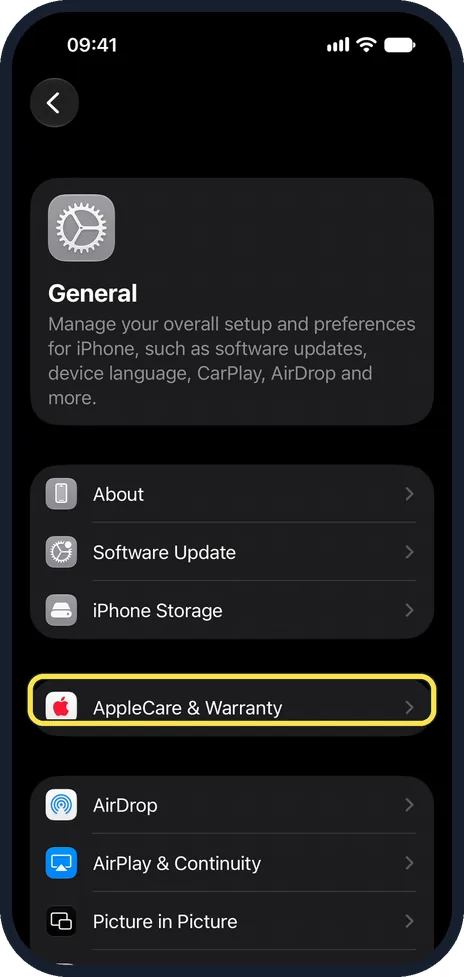
Tap AppleCare & Warranty
It is below iPhone Storage on the General page.
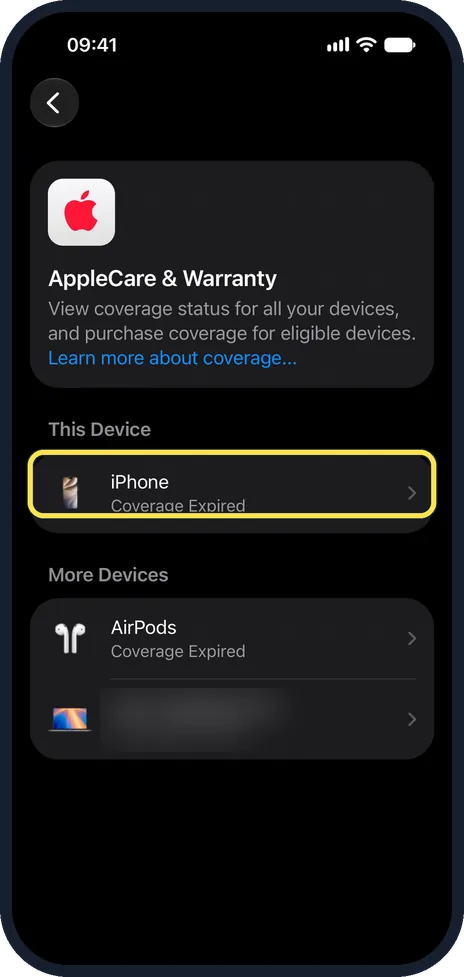
Tap the device
This Device is the iPhone in your hand. More Devices lists other devices on the same Apple Account, such as AirPods or a Mac (we blurred the name of ours). Each row says whether it is covered, for example Coverage Expired. Tap a row to see what is covered and the date the cover ends.
Check on the website
Go to checkcoverage.apple.com and enter the serial number. This also works for a device you are thinking of buying. The serial number is under Settings, General, About, and on the original box.
Get proof of cover
Sign in at mysupport.apple.com with your Apple Account and select the device. Click View Proof of Coverage to get a document you can show or print. Two-factor authentication must be on for the account.
About this guide
Before you pay for a repair or buy a used iPhone, it is worth knowing whether Apple's warranty or an AppleCare plan still applies. Both ways of checking are free and take a minute.
The screenshots are our own, taken on an iPhone 14 Pro running iOS 27.0.1. They were recorded over USB in QuickTime. The path is the same on iOS 26.
Good to know
In the EU and the UK, the seller is also liable under consumer law for defects that were there at the time of sale, for two years in most EU countries. This is separate from Apple's own one-year warranty and is claimed from whoever sold you the phone.
AppleCare plans can usually be added within a limited time after buying the device. The same page in Settings offers it while it is still possible.
Buying used: check the cover, and make sure the seller has switched off Find My: how to turn off Find My iPhone before you sell or repair it.
The state of the battery: how to check battery health on an iPhone.
In short: Settings, General, AppleCare & Warranty, tap the device. Or checkcoverage.apple.com with the serial number. Proof at mysupport.apple.com.
Links checked in October 2026. Menus and features can change after software updates. These steps match the version named at the top.
Did this guide work for you?
Sorry about that. What happened?