
What changed: the screenshots are now our own iPhone 17e on iOS 27.0.1, dark mode, and the wording is checked against those screens and Apple's iOS 27 guide.
howtosimply.com/guides/how-to-change-the-video-resolution-and-frame-rate-on-an-iphone/ · Checked October 2026 · iPhone 17e · iOS 27.0.1
In this guide
Open Settings, tap Camera, then Record Video, and tap the resolution and frame rate you want, for example 4K at 30 fps. The page shows how much storage one minute of video needs at each setting: about 65 MB at 1080p and 190 MB at 4K with 30 fps.
6 of 6 steps with real screenshots · 3 official sources below
- Device
- iPhone
- Shown on
- iOS 27.0.1 (iPhone 17e)
- App
- Settings
- Path
- Settings › Camera › Record Video
- Real screenshots
- 6 of 6 steps
- What we did
- Performed: we made the change on our device and show the result
- Checked
- October 2026
- Sources
- 3 official, linked below
Step by step
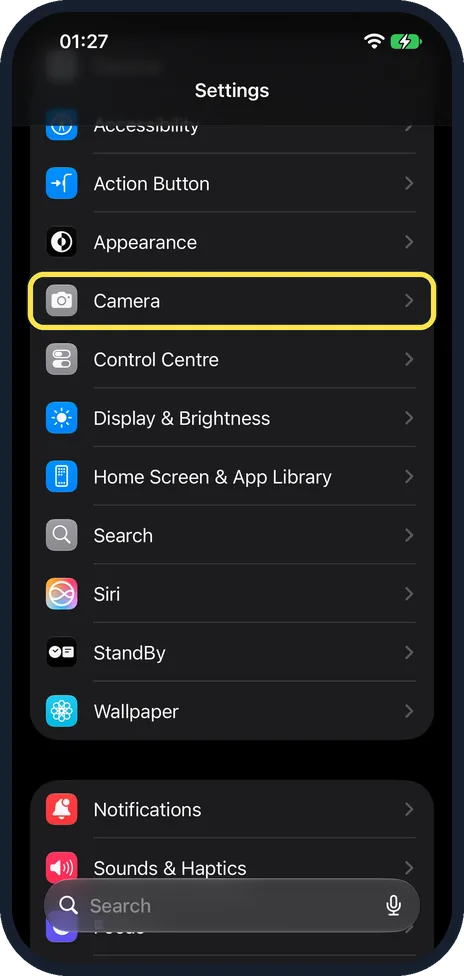
Open Settings and tap Camera
Settings opens with your account card, then any setup prompts, then Airplane Mode, Wi-Fi, Bluetooth, Mobile Service, Personal Hotspot and Battery. Scroll down to find Camera. It is below Appearance and above Control Centre.
Watch these steps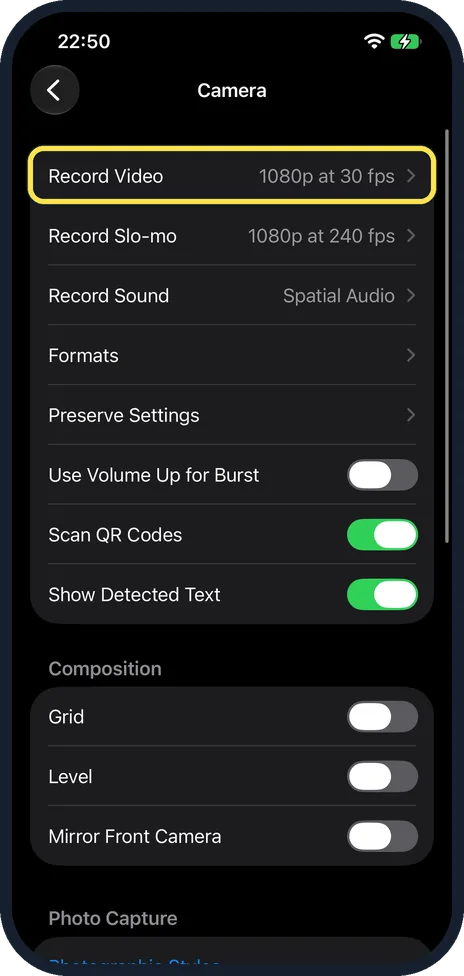
Tap Record Video
The row shows the current setting at the right, here 1080p at 30 fps.
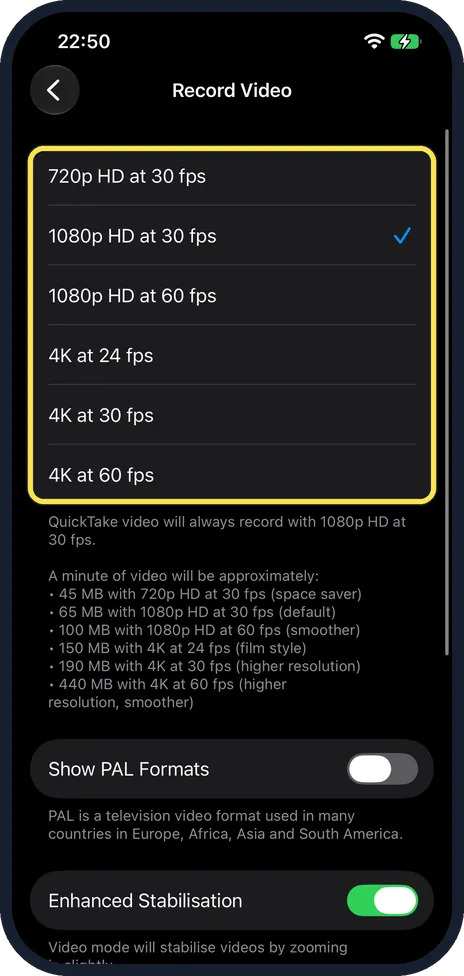
Tap the resolution and frame rate
On our iPhone 17e with iOS 27.0.1 the choices were 720p HD at 30 fps, 1080p HD at 30 or 60 fps, and 4K at 24, 30 or 60 fps. The tick shows the active one. On ours it was 1080p HD at 30 fps. A note below the list says QuickTake video always records with 1080p HD at 30 fps. 60 fps looks smoother with fast movement, 24 fps looks like cinema film.
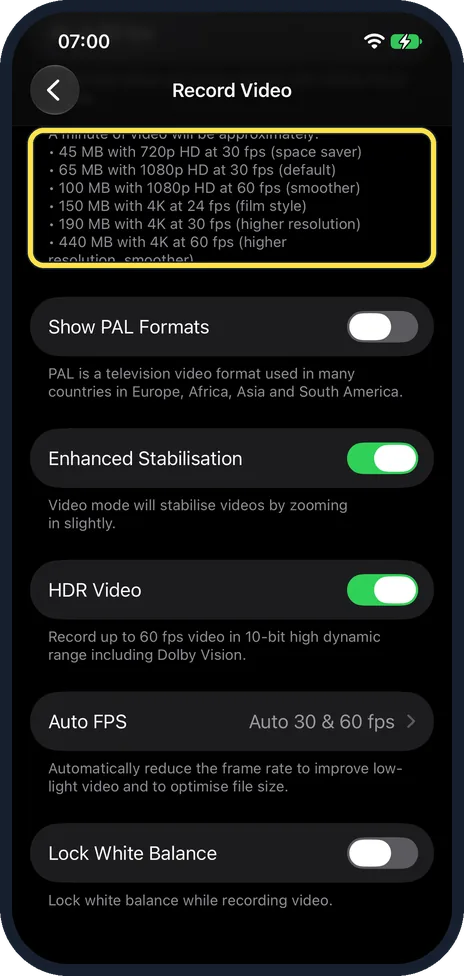
Check the storage each setting needs
Below the list, the iPhone gives the size of one minute of video. Ours listed about 45 MB at 720p, 65 MB at 1080p with 30 fps, 100 MB at 1080p with 60 fps, 150 MB at 4K with 24 fps, 190 MB at 4K with 30 fps and 440 MB at 4K with 60 fps. The page marks 1080p HD at 30 fps as the default, 720p as space saver and 4K at 24 fps as film style.
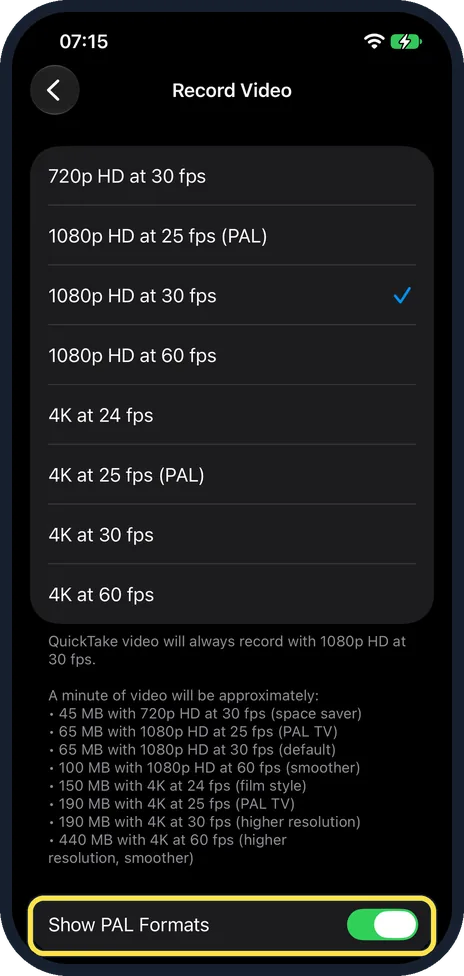
Europe: consider PAL formats
Show PAL Formats adds PAL formats to the list. PAL is used in many countries in Europe, Africa, Asia and South America. On our iPhone 17e it was off. When we switched it on, the list gained two choices, 1080p HD at 25 fps (PAL) and 4K at 25 fps (PAL), and the storage note added about 65 MB a minute for 1080p HD at 25 fps and 190 MB for 4K at 25 fps. We switched it off again afterwards.
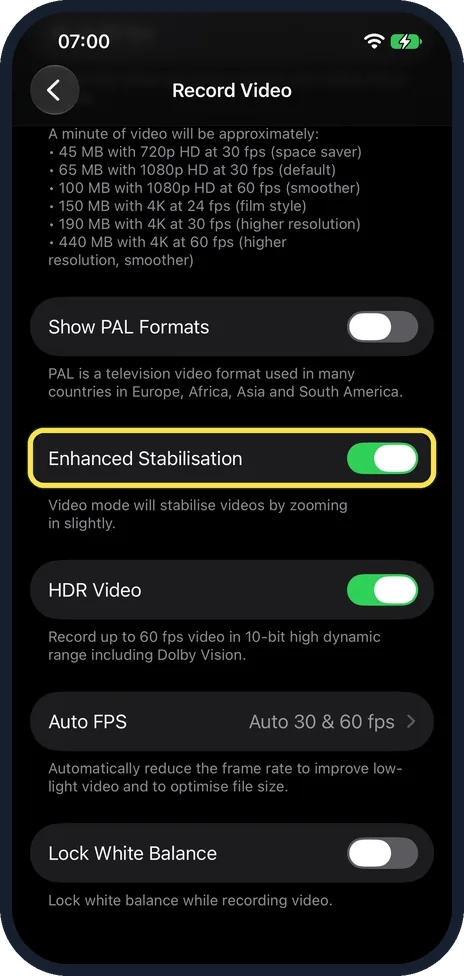
Leave Enhanced Stabilisation on
It steadies handheld video by zooming in slightly. Switch it off only if you need the full picture width. Apple says it is on by default. On our iPhone 17e it was on. Below it, our 17e showed HDR Video (on), Auto FPS (set to Auto 30 & 60 fps) and Lock White Balance (off). The note under HDR Video says it records up to 60 fps video in 10-bit high dynamic range including Dolby Vision. The note under Auto FPS says it reduces the frame rate automatically to improve low-light video and to optimise file size.
What changed: the screenshots are now our own iPhone 17e on iOS 27.0.1, dark mode, and the wording is checked against those screens and Apple's iOS 27 guide.
Watch these steps
If you do not see this option
- A resolution or frame rate you expect is not in the list. Apple says the formats and frame rates depend on the iPhone model. Each model shows its own list on the Record Video page. Source: Record a video with your iPhone camera
- You are looking for a PAL format. Switch on Show PAL Formats below the list. It was off on our iPhone 17e. Switched on, it added 1080p HD at 25 fps (PAL) and 4K at 25 fps (PAL). Source: Record a video with your iPhone camera
If this does not work
- A QuickTake video is still in 1080p. The Record Video page says QuickTake video always records in 1080p HD at 30 fps, whatever you choose here.
- Videos fill the storage quickly. Apple says faster frame rates and higher resolutions make larger files. Choose 1080p HD at 30 fps or 720p HD at 30 fps. Source: Record a video with your iPhone camera
- You need videos in H.264 rather than HEVC. Go to Settings, Camera, Formats and tap Most Compatible. The note on that page on our iPhone 17e says High Efficiency uses HEIF/HEVC to reduce file size, Most Compatible always uses JPEG/H.264, and 4K at 60 fps, 1080p at 240 fps and HDR video require High Efficiency.
About this guide
An iPhone records video in 1080p HD at 30 frames per second unless you change it. 4K is sharper and needs about three times the storage. In the Camera app, in Video mode, you can tap the resolution and frame rate at the top of the screen to switch. Settings shows the full list, with the storage each choice needs. The options listed here are the ones our iPhone 17e offers; other models show their own list on the same page.
Screenshots: iPhone 17e, iOS 27.0.1, dark mode.
Good to know
A ten-minute clip at 4K with 60 fps takes about 4.4 GB. If storage is short: iPhone storage full? 7 ways to free up space fast.
The Formats row on the Camera page sets the file format for video as well as photos. On our iPhone 17e it offered High Efficiency (HEIF/HEVC) and Most Compatible (JPEG/H.264). For photos, see how to make an iPhone take JPG photos instead of HEIC.
Slow motion has its own row on the Camera page, Record Slo-mo. Apple says Slo-mo records in 1080p HD at 240 fps with the back camera and 120 fps with the front camera unless you change it there.
In short: Settings, Camera, Record Video, tap the setting. 1080p: about 65 MB a minute. 4K at 30 fps: about 190 MB.
- Apple iPhone User Guide: Record a video with your iPhone camera
- Apple Support: Change video recording settings on iPhone
- Apple iPhone User Guide: Change video recording settings on iPhone
Links checked in October 2026. Menus and features can change after software updates. These steps match the version named at the top.
Did this guide work for you?
Sorry about that. What happened?