
howtosimply.com/guides/apps-keep-crashing-or-closing-on-a-samsung-galaxy-fixes/ · Checked October 2026 · Samsung Galaxy A57 5G (SM-A576B), One UI 8.5, Android 16
In this guide
Close the app from Recents and open it again, then update it in the Play Store. If it still closes, open Settings, Apps, the app, Storage and tap Clear cache. Restart the phone, and check in Device care that storage and memory are not nearly full. Clear data is the last step, because it signs you out of the app.
6 of 6 steps with real screenshots · 2 official sources below
- Device
- Android
- Shown on
- Samsung Galaxy A57 5G (SM-A576B), One UI 8.5, Android 16
- Starts in
- Recents
- Real screenshots
- 6 of 6 steps
- What we did
- Observed: looked at each screen, changed nothing
- Checked
- October 2026
- Sources
- 2 official, linked below
Step by step
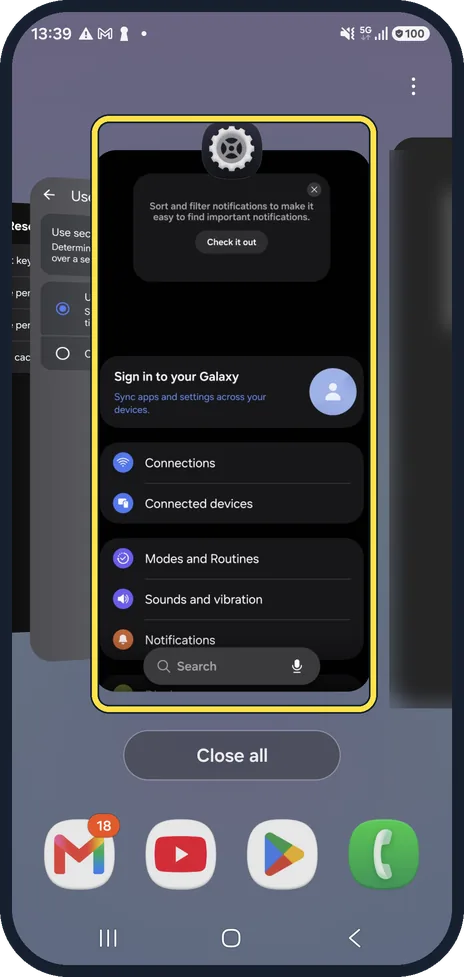
Close the app and open it again
Open Recents (the button with three lines, or swipe up and hold), swipe the app away and open it again. This starts it fresh.
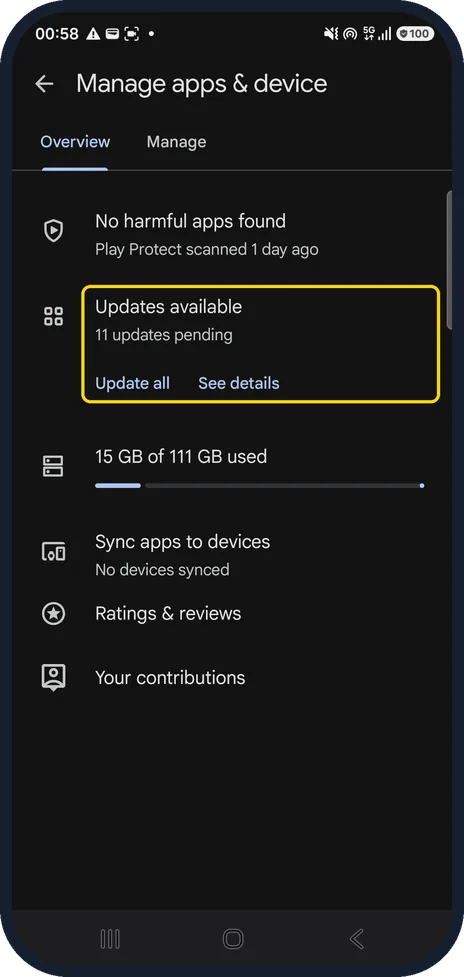
Update the app
Open the Play Store, tap your profile picture, then Manage apps & device. On the Overview tab, Updates available has Update all and See details.
On our Galaxy it showed 11 updates pending. A crash that many people have is often fixed in the next version.
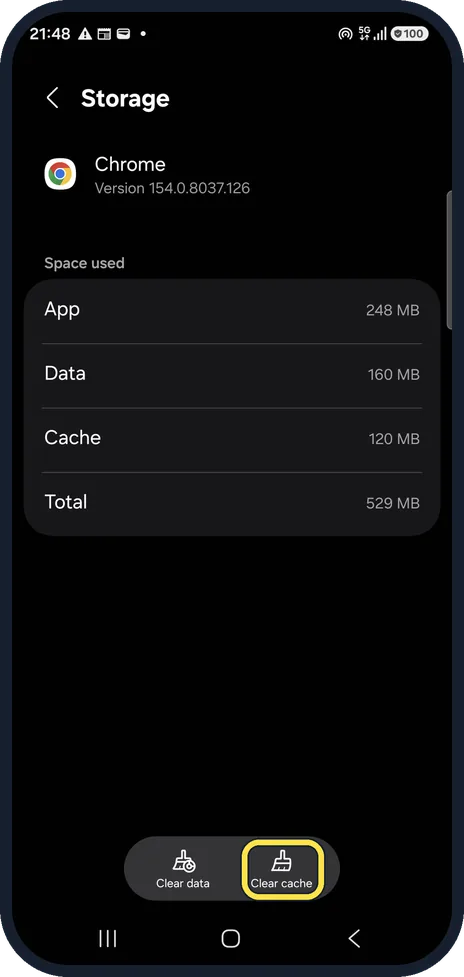
Clear the app's cache
Open Settings, Apps, the app and Storage, then tap Clear cache. It removes temporary files only; your sign-in and data stay.
On our Galaxy, Chrome had 120 MB of cache. We did not tap it.
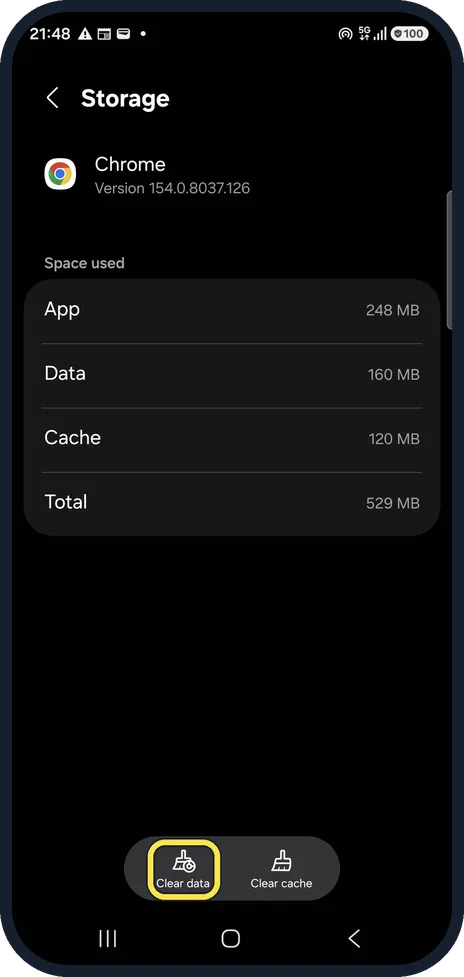
Clear data only as a last step
Clear data, next to Clear cache, resets the app as if it were new: you sign in again and lose anything the app keeps only on the phone.
Check storage and memory
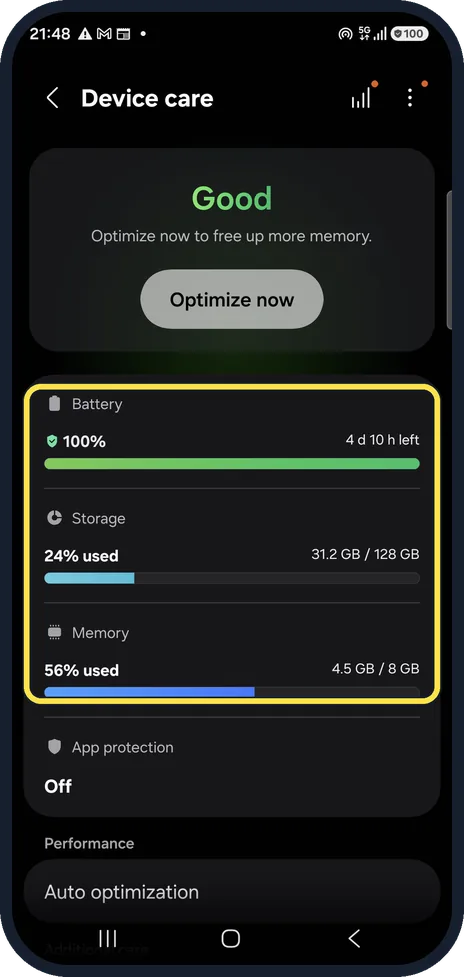
Open Settings, Device care. On our Galaxy it showed Storage 24% used and Memory 56% used.
If storage is almost full or memory stays very high, tap Optimize now and free up space.
Restart the phone
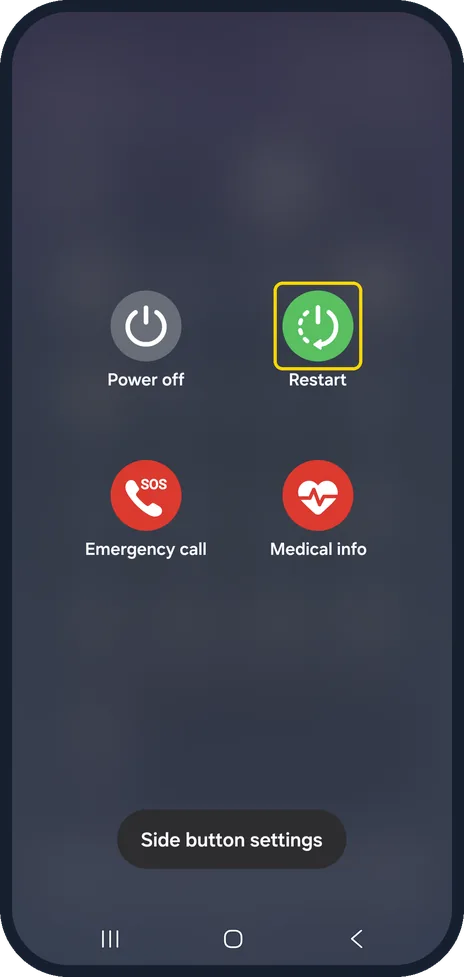
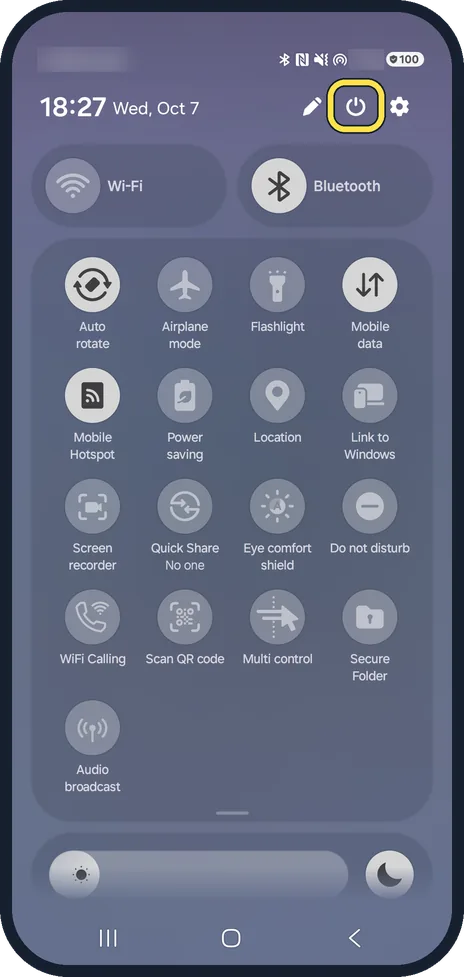
Pull down the quick panel, tap the power icon at the top, then Restart. A restart clears apps stuck in memory.
On our Galaxy the menu also shows Power off, Emergency call and Medical info.
If you do not see this option
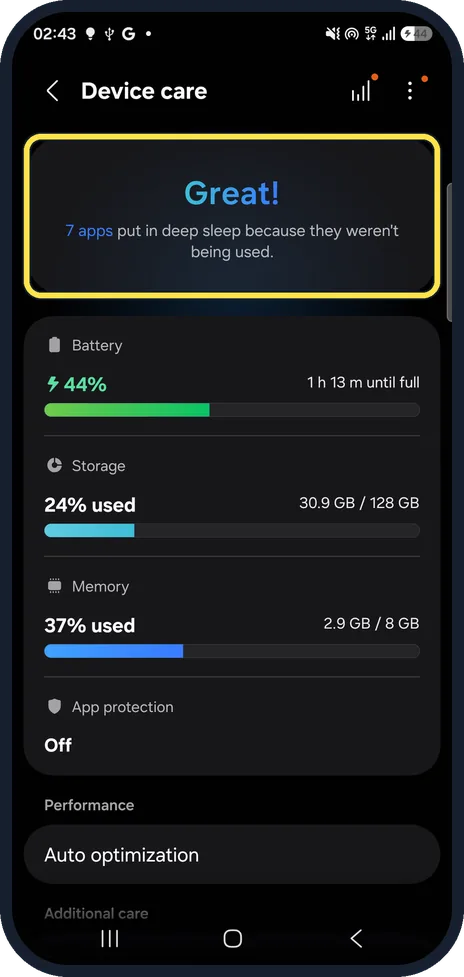
- Your Galaxy runs One UI 9. Device care has no Optimize now button. On our Galaxy A57 after the One UI 9.0 update, the top card said Great! and that 7 apps were put in deep sleep because they weren't being used. Storage and Memory are listed below it, and Auto optimization further down.
- No Clear cache button Open Storage on the app's own page in Settings, Apps. On our Galaxy, Clear data and Clear cache sit at the bottom of the Storage page.
- No Updates available line Check you are on the Overview tab of Manage apps & device, not the Manage tab. On our Galaxy, Updates available sits below Play Protect.
- No power icon in the quick panel Swipe the quick panel fully down. On our Galaxy the power icon sits at the top, between the pencil and the settings icons.
If this does not work
- The app still closes after clearing the cache Try Clear data next. Samsung also suggests uninstalling the app and installing it again. Sources: How to fix apps keep crashing and freezing, App is crashing or not working on Samsung phone or tablet
- Many apps keep closing Check storage and memory in Device care, then install the latest software update, as Samsung suggests (Settings, Software update). Sources: How to fix apps keep crashing and freezing, App is crashing or not working on Samsung phone or tablet
- A restart does not help Samsung suggests installing the latest software update. If only one app is affected, uninstall and reinstall it. Sources: How to fix apps keep crashing and freezing, App is crashing or not working on Samsung phone or tablet
About this guide
When one app keeps closing, the cause is almost always that app: an old version, a damaged cache or not enough free memory. When many apps close, look at the phone: storage, memory or a pending software update.
On other Galaxy phones and older One UI versions a few names and positions may differ.
Good to know
If the app closes on several phones too, the problem is the app itself and only its maker can fix it; check its Play Store reviews.
Samsung also suggests installing the latest software update (Settings, Software update) and, if one app still crashes, uninstalling and reinstalling it. Google keeps stopping and clearing an app's cache have their own guides.
In short: Restart the app, update it, clear its cache (Settings, Apps, the app, Storage), check Device care, restart the phone. Clear data last.
- Samsung Latin: How to fix apps keep crashing and freezing
- Samsung US: App is crashing or not working on Samsung phone or tablet
Links checked in October 2026. Menus and features can change after software updates. These steps match the version named at the top.
📷 See real photos from the Galaxy A57 in our Camera Lab, next to 10 other phones.
Did this guide work for you?
Sorry about that. What happened?