How to uninstall or disable apps on a Google Pixel (Android 17)
- Shown on
- Pixel 10a
- Software
- Android 17More Android 17 guides
- Checked
- November 2026
- Real screenshots
- 2 of 3 steps
Quick answer
Google's way is the Play Store: tap your profile icon, Manage apps and devices, Manage, pick the app and tap Uninstall. Apps that came with the Pixel, such as YouTube, can't be uninstalled: on ours, App info (touch and hold the icon) offered Disable and Archive instead.
Watch these steps
Video: on our Pixel 10a (Android 17) we touch and hold YouTube on the home screen, tap App info, and find Disable next to Force stop. We did not disable it. No sound.
Steps
- 1
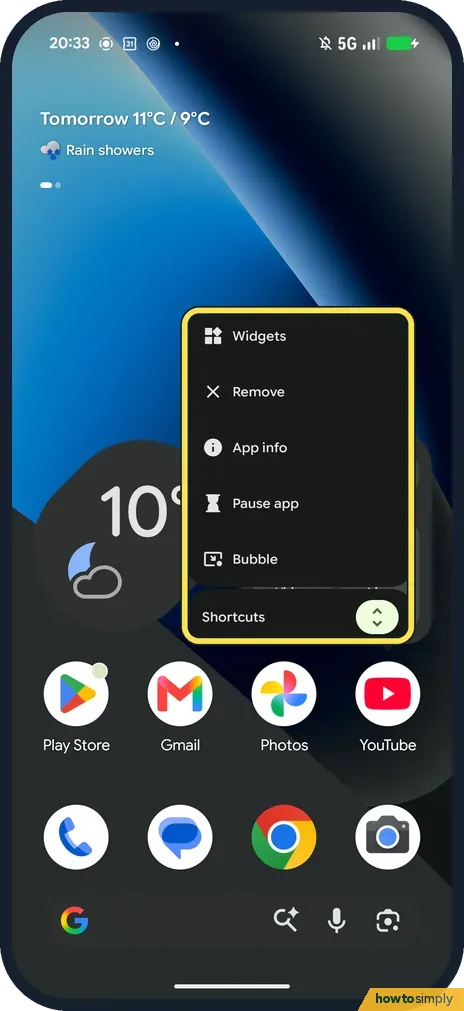
Touch and hold the app
On the home screen or in the apps list, touch and hold the app's icon. Ours, on YouTube, showed Widgets, Remove, App info, Pause app, Bubble and Shortcuts. Tap App info.
- 2
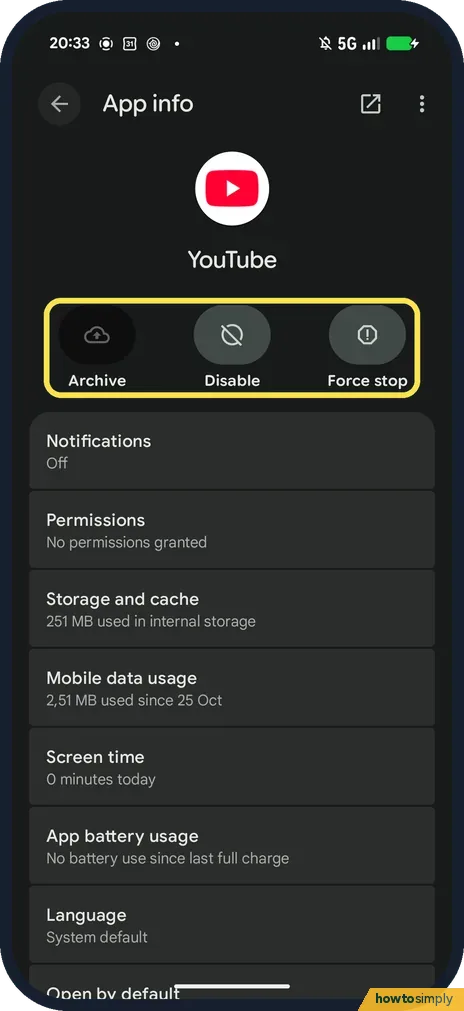
Disable a built-in app
YouTube came with ours, so App info showed Archive, Disable and Force stop, with no Uninstall. Tap Disable to switch off an app you can't remove. We didn't tap anything.
- 3
Uninstall from the Play Store
For apps you installed, Google says to open the Play Store, tap your profile icon at the top right, then Manage apps and devices, Manage. Select the app and tap Uninstall. We didn't do this on ours.
If you do not see this option
- No Uninstall button? The app came with the phone, like YouTube on ours. Use Disable. Google says you can add a disabled app back later. Source: Delete apps on your Android device
- What does Archive do? Google says archiving removes the app but keeps its icon and your personal data on the phone, so you can bring it back later. Source: Delete apps on your Android device
- Remove on the long-press menu? Ours showed Remove at the top of the menu. We didn't tap it, so we can't say whether it removes only the icon or the app.
If this does not work
- Paid for the app? Google says you can reinstall a bought app without paying again.
- Want the space back without removing the app? App info has Storage and cache. Google says clearing the cache deletes temporary data. Ours showed 251 MB for YouTube.
Good to know
For more space overall, see how to free up storage on a Google Pixel.
About this guide
Most people go looking for Uninstall and find Disable instead. That happens with apps that came on the phone.
- Device
- Android
- Shown on
- Google Pixel 10a, Android 17 (build CP3A.261005.005)
- Starts in
- Home screen
- Real screenshots
- 2 of 3 steps
- What we did
- Observed: looked at each screen, changed nothing
- Checked
- November 2026
- Sources
- 2 official, linked below
The screenshots are from our Google Pixel 10a with Android 17 (build CP3A.261005.005), in Dark mode, taken on 18 November 2026. We only looked at these screens and changed nothing.
Sources
Links checked October 2026. Menus and features can change with updates.Did this guide work for you?
Sorry about that. What happened?
Get new guides by email
Our newest guides, sent to your inbox. Free, and you can unsubscribe in one click.
We'll email you to confirm. How we use your email
Follow howtosimply on Facebook
We share our new guides on our Facebook page, so the next fix turns up in your feed.
Follow on Facebook