GOOGLE PIXEL
How to see notification history on a Google Pixel (Android 17)
Open Settings, tap Notifications, then Notification history, and turn on Use notification history. It was off on our Pixel. From then on, alerts from the last 24 hours are listed there, grouped by app, including ones you swiped away.

3 of 3 steps show a real screenshot from our Pixel 10a. Each step was checked against the maker's own instructions, linked at the end.
Steps
- 1
Open Notification history
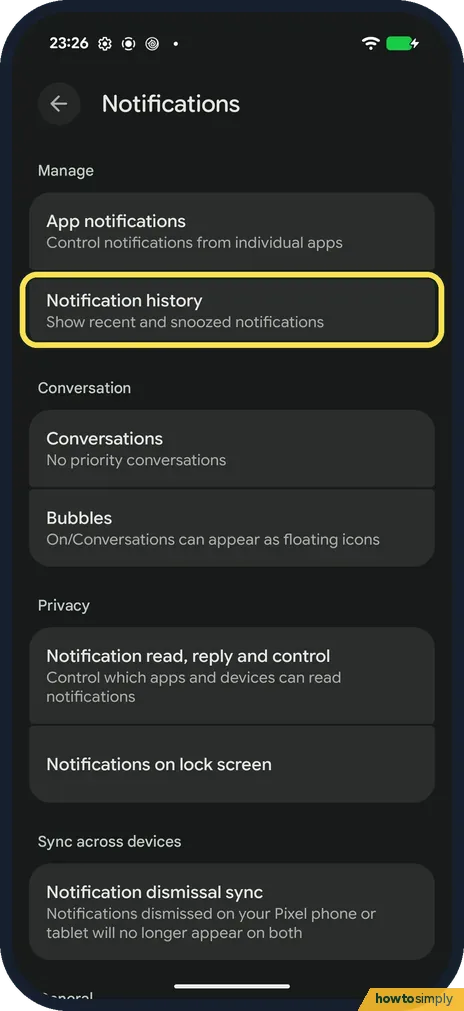
Open Settings and tap Notifications. Tap Notification history: Show recent and snoozed notifications.
- 2
Turn on Use notification history
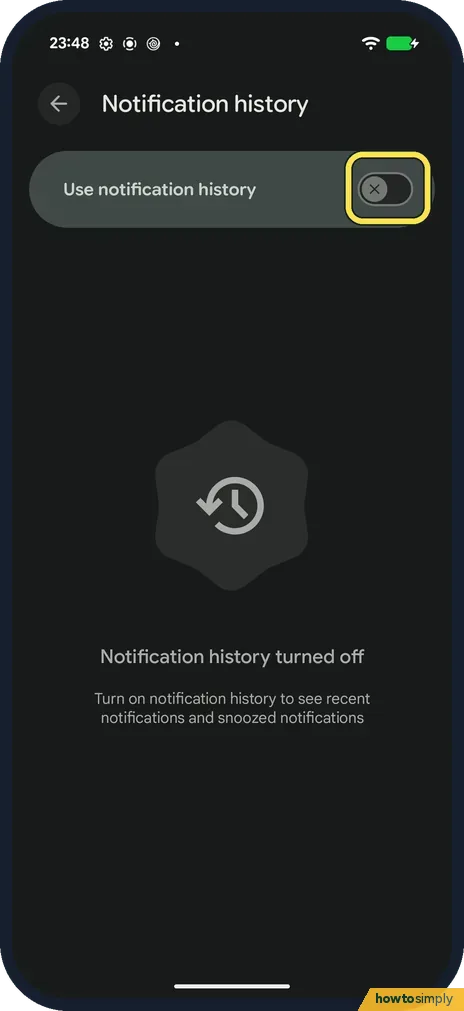
On ours it was off, and the page said Notification history turned off. Tap the switch.
- 3
Read your history
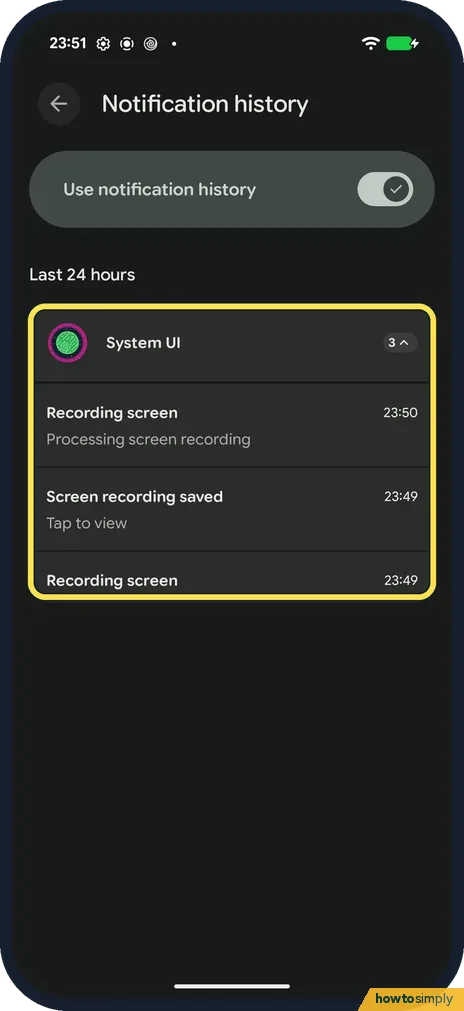
New alerts appear under Last 24 hours, grouped by app. Tap a group to open or close it. Ours shows three System UI alerts from a screen recording.
If you do not see this option
- History is empty? It only keeps notifications that arrive after you turn it on. We switched it on, made a screen recording, and its alerts then appeared.
- Looking for older alerts? The list covers the last 24 hours.
- No snooze option on alerts? Google says to turn on Allow notification snoozing in Settings, Notifications. Then tap the down arrow on an alert and choose Snooze. To change how long it waits, tap the down arrow again, Google says. Source: Control notifications on Android
If this does not work
- An app's alerts never appear here? If the app's notifications are off, nothing is sent at all: see the Pixel notifications checklist below.
- Alert gone after you tapped it? Tapping opens the app. Come back to Notification history to see the list again.
- Want to stop one app's alerts from the list? Google says to touch and hold an alert under recently dismissed to manage it. That takes you to its notification controls without hunting through Settings.
- Snoozed alert seems lost? Google says notification history also shows snoozed notifications. Look there if you snoozed something and cannot find it in the notification shade.
- Notification history missing on another phone? Google says some devices don't have notification history. On a phone that does, it is under Settings, Notifications.
Good to know
Not getting an app's alerts at all? Pixel not getting notifications? 6 settings to check.
Once it is on, notification history stores the text of your alerts on the phone, including message previews, so anyone who can unlock the phone can read them in Settings. If that worries you, keep a strong screen lock, or turn the switch off again: the list stops filling up.
If message previews are sensitive, you can also limit what shows on the lock screen: see how to hide sensitive content on the lock screen.
If too many alerts arrive at once, notification cooldown softens bursts of sound and pop-ups from the same app.
About this guide
- Device
- Android
- Shown on
- Google Pixel 10a, Android 17 (build CP3A.260905.009)
- App
- Settings
- Path
- Settings › Notifications › Notification history
- Real screenshots
- 3 of 3 steps
- Checked
- October 2026
- Sources
- 2 official, linked below
Sources
Links checked October 2026. Menus and features can change with updates.Spotted a mistake? Menus change with updates, and we want every step to match your screen. Email us about this page or use the contact form. We read every report, and fixes are listed on What changed.
Liked this guide?
Follow us for new guides and short how-to videos.
Did this guide work for you?
Sorry about that. What happened?