
howtosimply.com/guides/how-to-pause-youtube-watch-and-search-history-on-android/ · Checked October 2026 · Samsung Galaxy A57 5G (SM-A576B), One UI 8.5, Android 16
In this guide
In YouTube tap You, the gear, Manage all history and open the Controls tab. Tap Turn off, read the dialog and tap Pause. YouTube stops saving new history on every device signed in to the account; what is already saved stays until you delete it.
5 of 5 steps with real screenshots · 1 official source below
- Device
- Android
- Shown on
- Samsung Galaxy A57 5G (SM-A576B), One UI 8.5, Android 16
- App
- YouTube
- Real screenshots
- 5 of 5 steps
- Checked
- October 2026
- Sources
- 1 official, linked below
Step by step
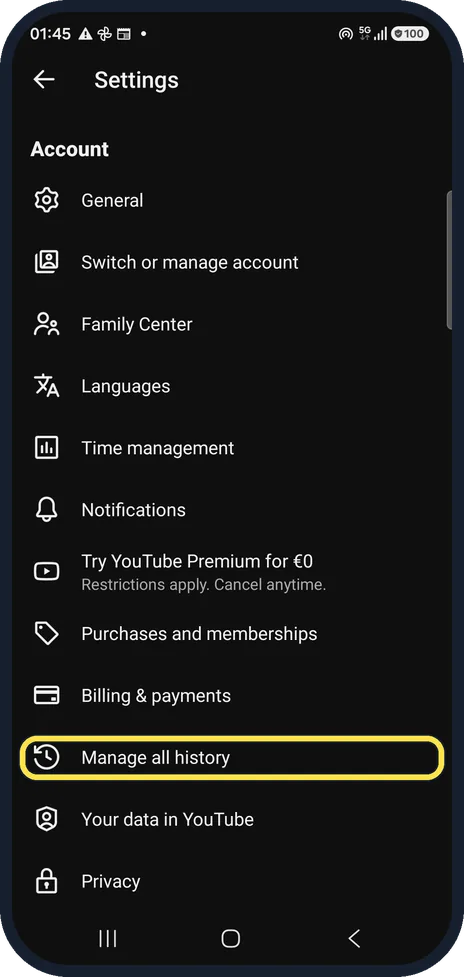
Open Manage all history
In YouTube tap You at the bottom right, then the gear at the top right. Tap Manage all history.
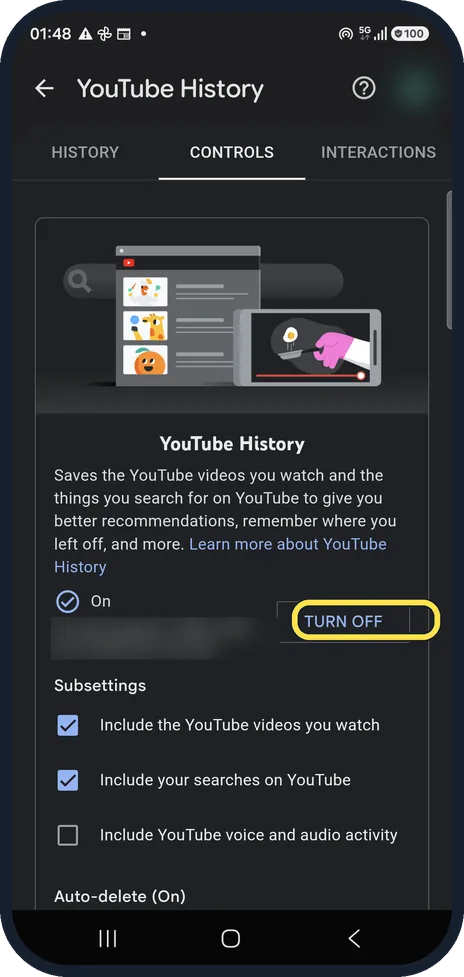
Tap Turn off on the Controls tab
YouTube History shows On, with subsettings for videos you watch, searches and voice activity.
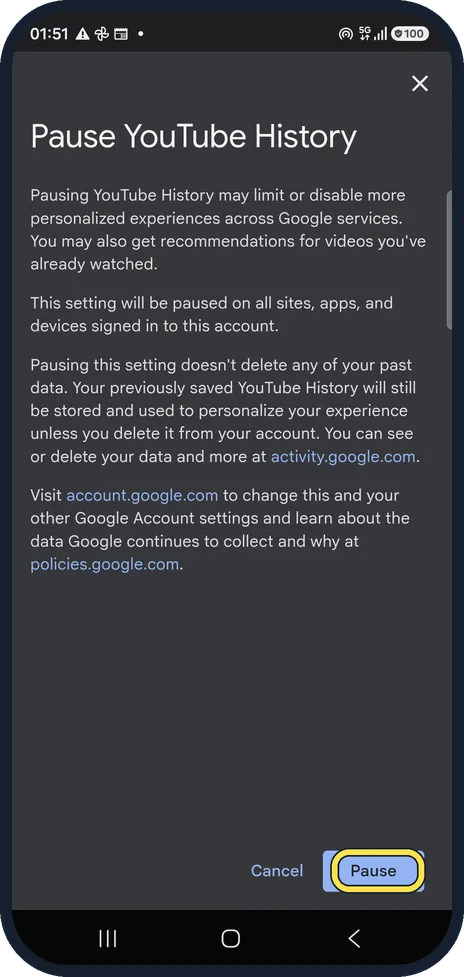
Tap Pause
The dialog explains that the pause applies to every site, app and device signed in to this account, and that your saved history stays.
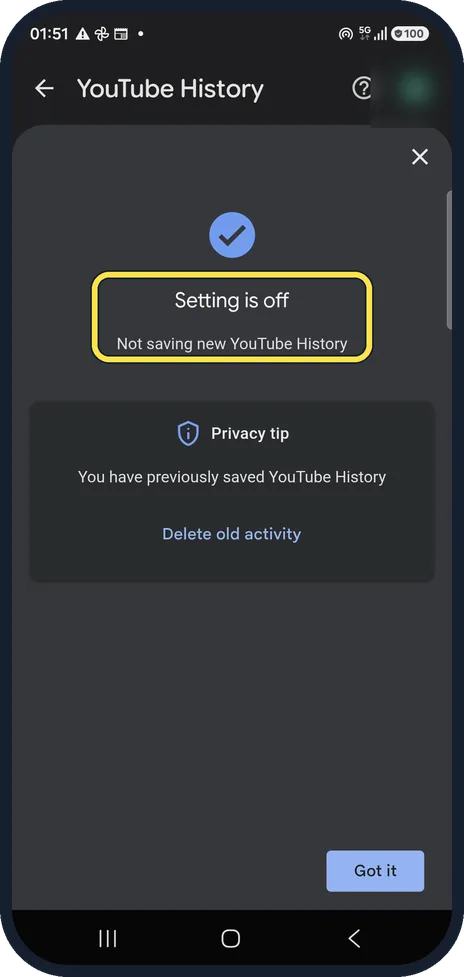
Check it is off
Setting is off: Not saving new YouTube History. Delete old activity removes what is already saved.
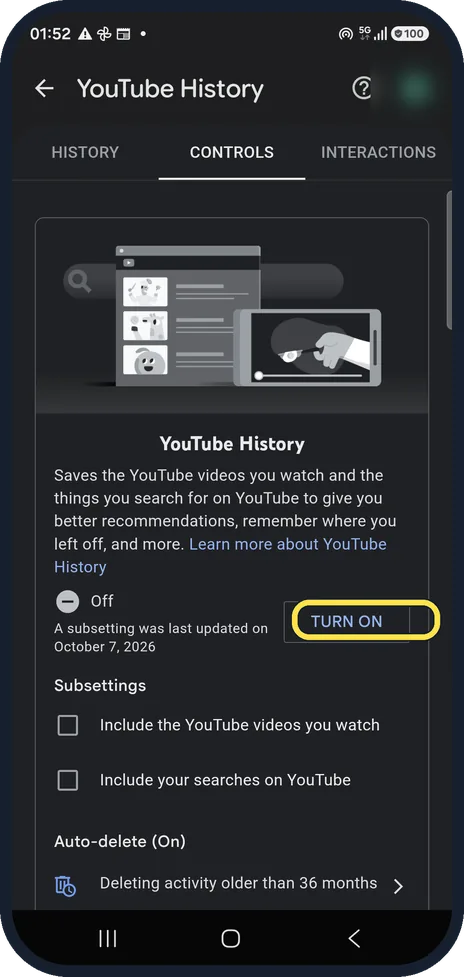
Turn it back on any time
The Controls tab now shows Off with Turn on. Auto-delete underneath stays as it was; ours deleted activity older than 36 months.
If you do not see this option
- You are not signed in YouTube says that signed out you use the gear, History & privacy, then Pause watch history or Clear watch history instead. Source: View, delete, or turn on or off watch history (Android)
- You only want to stop watch history, not searches YouTube says to untick Include the YouTube videos you watch on the Controls tab, instead of turning history off completely. Source: View, delete, or turn on or off watch history (Android)
If this does not work
- The home page is nearly empty now YouTube says that with no relevant recent history and history turned off, features such as home page recommendations are removed. Turn history back on to get them back. Source: View, delete, or turn on or off watch history (Android)
- Old videos still shape what you see YouTube says that only videos you delete stop counting for recommendations. Use the Delete button in Manage all history; it also deletes searches from the same time range. Source: View, delete, or turn on or off watch history (Android)
About this guide
Pausing history stops YouTube learning from what you watch and search. It does not delete anything.
The screenshots are from the YouTube app, version 21.39.522, on a Samsung Galaxy A57 5G with Android 16 and One UI 8.5, in dark mode.
This is the one guide where we used a signed-in account; the avatar is blurred. We paused history and switched it straight back on.
Good to know
Paused history usually makes the home feed less personal and can leave it nearly empty.
For one private session without pausing anything, use Incognito mode.
In short: YouTube, gear, Manage all history, Controls: Turn off, Pause.
Links checked in October 2026. Menus and features can change after software updates. These steps match the version named at the top.
📷 See real photos from the Galaxy A57 in our Camera Lab, next to 10 other phones.
Did this guide work for you?
Sorry about that. What happened?