
howtosimply.com/guides/mac-running-slow-8-fixes-to-try/ · Checked October 2026 · MacBook Pro · macOS Tahoe 26
In this guide
Restart the Mac, check Activity Monitor for an app using too much memory or processor, free up storage until at least 10% of the disk is empty, and remove apps that open at login. Then install any macOS update.
4 of 8 steps with real screenshots · 3 official sources below
- Device
- Mac
- Shown on
- macOS Tahoe 26 (MacBook Pro)
- App
- System Settings
- Real screenshots
- 4 of 8 steps
- Checked
- October 2026
- Sources
- 3 official, linked below
Step by step
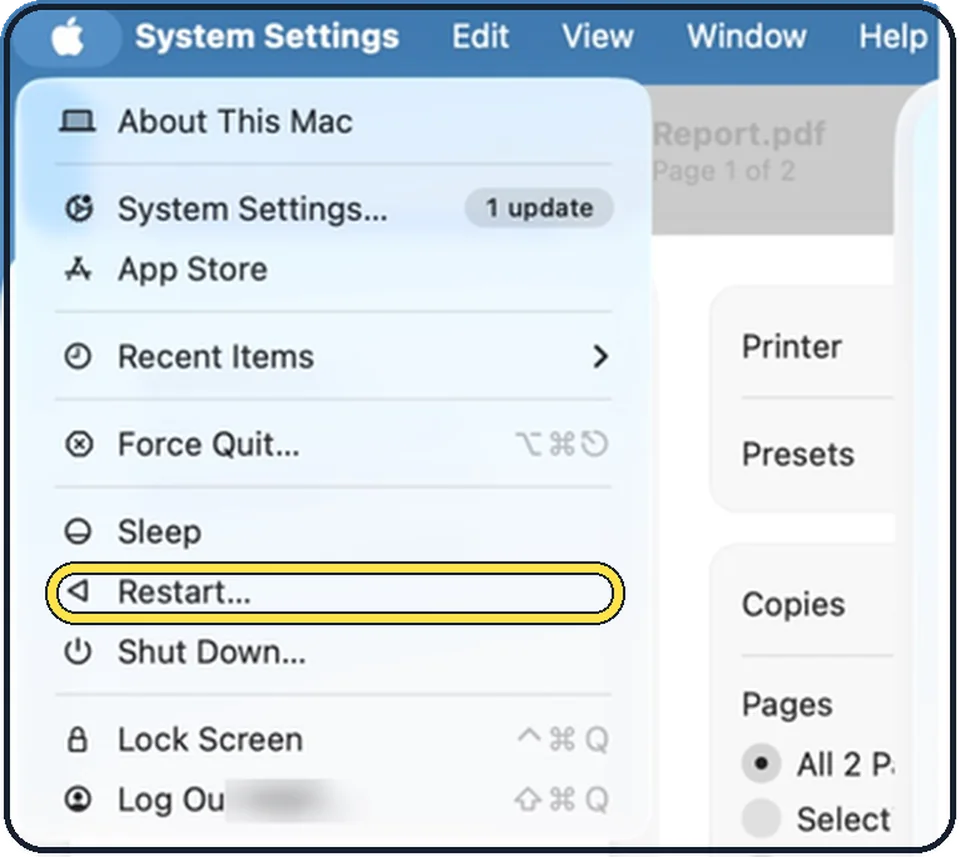
Tap the picture to see it full size Restart
Click the Apple menu and choose Restart. If you normally only close the lid, the Mac may have been running for weeks.
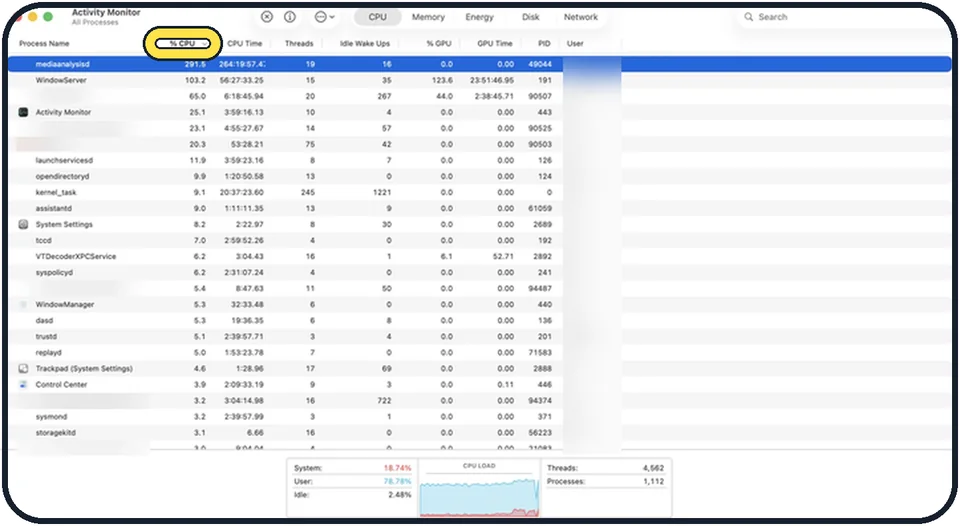
Zoomed in on the setting. Tap to see the whole screenTap the picture to see it full size Find the app that is using everything
Open Activity Monitor from Applications, Utilities, or press Command + Space and type its name. On the CPU tab, click the % CPU column to sort. An app that stays near the top at a high percentage is the cause. Select it and click the X button to quit it.
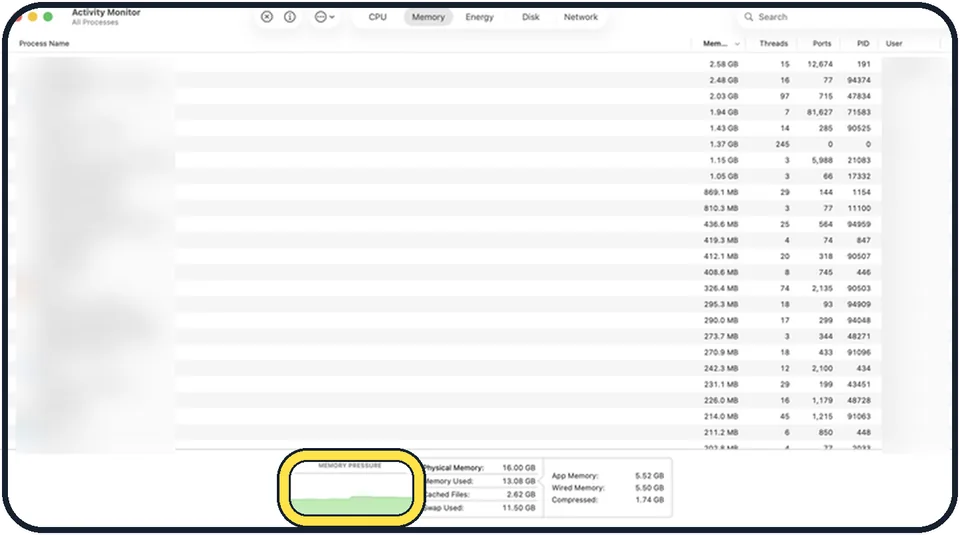
Zoomed in on the setting. Tap to see the whole screenTap the picture to see it full size Look at Memory Pressure
On the Memory tab, the graph at the bottom should be green. Apple reads it this way: green, the Mac is using all of its memory efficiently; yellow, it might eventually need more memory; red, it needs more memory. Closing apps and browser tabs lowers the pressure for now.
Free up storage
A nearly full disk slows macOS badly. Our guide: how to check and free up storage on a Mac.
Trim login items
Fewer apps starting by themselves means more memory for your work: how to stop apps opening at login.
Close browser tabs and remove extensions
Each tab is a small app. Dozens of tabs and several extensions can use more memory than everything else together.
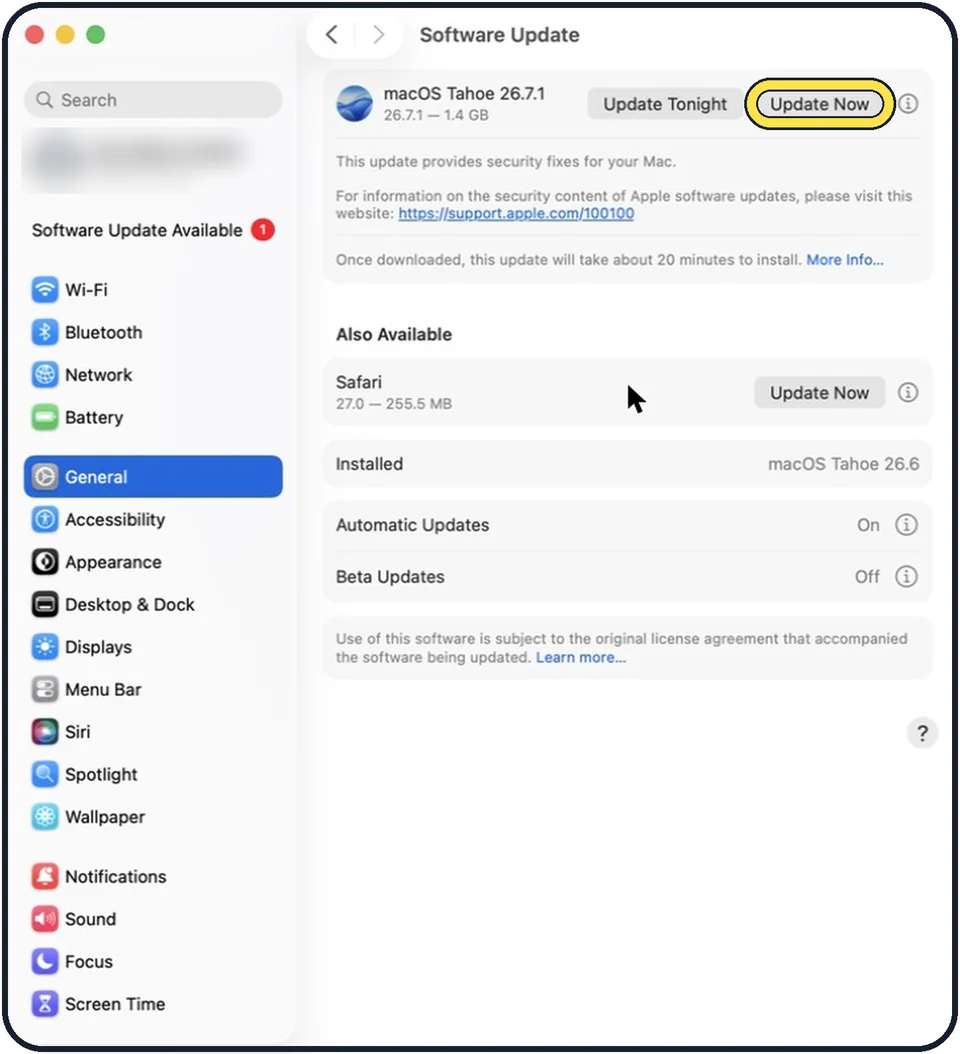
Zoomed in on the setting. Tap to see the whole screenTap the picture to see it full size Update macOS and your apps
Open System Settings, General, Software Update. Update apps in the App Store under Updates.
Give it time after an update
After a big macOS update, the Mac re-indexes files for search and Photos for a few hours. It is slow and warm during that time and recovers by itself when left on and plugged in.
If this does not work
- One app stays at the top of the CPU column at a high percentage. That app is the likely cause. Quit it. If it does the same after you open it again, check that it is made for your Mac: Apple says some apps need a different processor or graphics card. Compare with System Settings, General, About. Source: If your Mac runs slowly
- Memory Pressure stays yellow or red with only a few apps open. Apple says yellow means the Mac might eventually need more memory and red means it needs more. On most current Macs the memory cannot be added later, so use fewer apps and tabs at once. Source: Check if your Mac needs more RAM
- The disk is almost full. Apple names low free space on the startup disk as a cause. Free up space first, then test again. Source: If your Mac runs slowly
- The Mac is fast in safe mode but slow after a normal restart. Apple says this points to software that safe mode stops from loading, such as a login item. Remove login items one by one. If it stays fast after a normal restart, safe mode's disk check and cache clearing may have fixed it. Source: Use safe mode on your Mac
- Everything is slow and the disk may be faulty. Run First Aid in Disk Utility. Apple lists a faulty disk as a cause of a slow Mac. Source: If your Mac runs slowly
About this guide
A slow Mac is usually short of memory or storage, or has one app misbehaving in the background. The Mac has a built-in tool that shows which.
Good to know
If the fans are loud and the Mac is hot, check that the vents are not blocked and that it is not sitting on a blanket.
You do not need a "cleaner" app. Many are aggressive adverts, and some are malware.
An older Mac with a mechanical hard disk and 8 GB of memory or less will stay slow with current software whatever you do.
In short: Restart, check Activity Monitor, free storage, trim login items, update.
- Apple Support: If your Mac runs slowly
- Apple Activity Monitor User Guide: Check if your Mac needs more RAM
- Apple Support: Use safe mode on your Mac
Links checked in October 2026. Menus and features can change after software updates. These steps match the version named at the top.
Did this guide work for you?
Sorry about that. What happened?