How to convert units on an iPhone by selecting the text
By Saadat Rafiq · 2 min read · 3 steps · Published 6 October 2026 · ▶ Video demo
Select a value with its unit, such as 40lbs, in text on the iPhone. In the menu that appears, tap the arrow to see more choices: the converted values, such as 18,14 kg, are listed below Look Up and Translate. No app or calculator is needed.
- Device
- iPhone
- Shown on
- iOS 27.0.1 (iPhone 14 Pro)
- Real screenshots
- 3 of 3 steps
- Checked
- October 2026
- Sources
- 1 official, linked below
Step by step
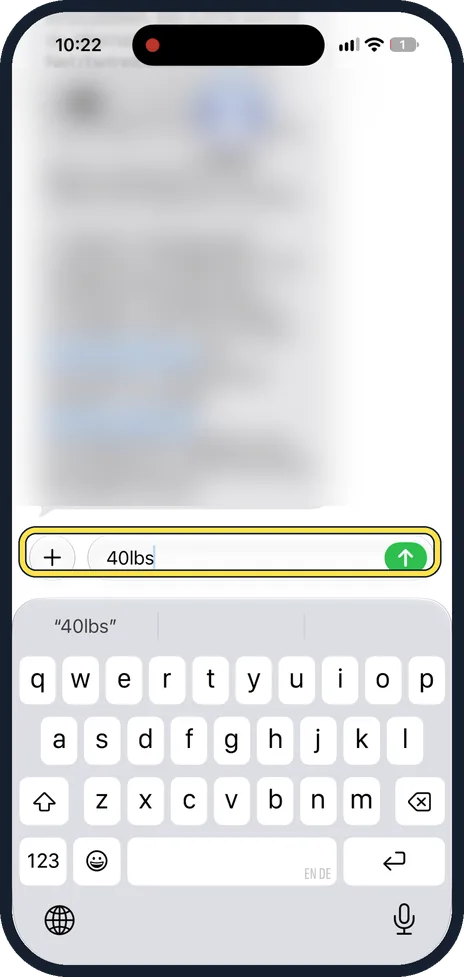
Type or find a value with a unit
Here we typed 40lbs into a message. It works with the unit written straight after the number.
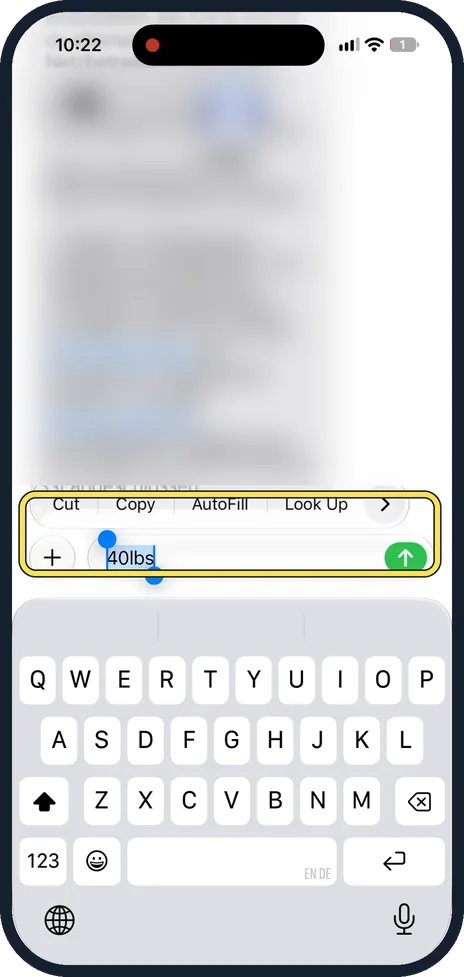
Select it
Double-tap the value, or touch and hold it, so it is highlighted. A bar with Cut, Copy, AutoFill and Look Up appears above it.
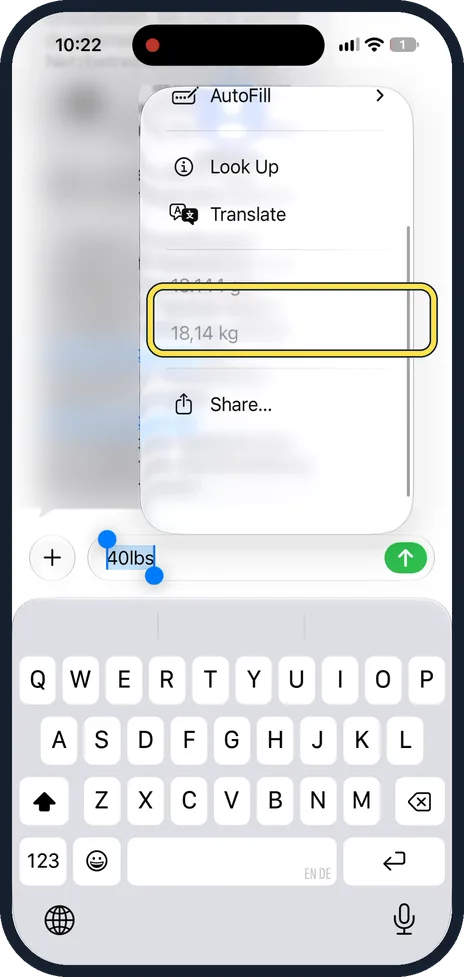
Open the rest of the menu
Tap the arrow at the right end of the bar. The menu opens with Look Up and Translate, and below them the value converted into other units. Ours showed 40 pounds as 18.144 g and 18,14 kg, in the German number format. Nothing is typed into your text: the menu only shows the result.
If you do not see this option
- Your iPhone may run a different version. The screenshots here show iOS 27.0.1 (iPhone 14 Pro). On another version a setting can have a different name or sit in a different place. See your version under Settings, General, About. Update under Settings, General, Software Update; back up first, plug in and use Wi-Fi. Source: Find the software version on your iPhone Source: Update your iPhone or iPad
- Search for it. Open Settings, tap the search field, type the name of the setting and tap the result. Apple notes that the sections in Settings depend on the iPhone model. Source: Find settings on iPhone
- It is greyed out. Screen Time restrictions can lock settings; Apple gives this as the reason when the Apple Account row is greyed out. Check Settings, Screen Time, Content & Privacy Restrictions. Source: If you can't sign out due to restrictions, or your Apple Account is grayed out in Settings
About this guide
When you select a measurement in text, the iPhone shows it converted in the menu that opens. We typed 40lbs into a message in Messages and selected it.
Our iPhone is set to the German region, so it writes numbers the German way: a dot groups the thousands and a comma marks the decimals. So 18.144 g means eighteen thousand one hundred and forty-four grams, and 18,14 kg means 18.14 kilograms: 40 pounds is about 18 kilograms. In UK or US format the same values are written 18,144 g and 18.14 kg.
The screenshots are our own, taken on an iPhone 14 Pro running iOS 27.0.1.
Good to know
To convert a value you type in, use the Calculator app: Apple explains its Convert option for units and currency.
If you want the numbers written the UK or US way, the region is set in Settings, General, Language & Region.
In short: Select a value with its unit, tap the arrow in the bar, and read the conversion below Look Up and Translate.
Links checked on 4 October 2026. Rules and prices change. Check the official source before you act.