CarPlay not working on an iPhone? 8 fixes to try
2 min read · 8 steps · Updated 2 October 2026
Check that Siri is switched on, restart the iPhone and the car, and try a different USB cable and port. For wireless CarPlay, switch on Bluetooth and Wi-Fi. If it still fails, open Settings, General, CarPlay, tap your car, tap Forget This Car and set it up again.
CarPlay needs three things to agree: the iPhone, the car and the connection between them. A worn cable is the most common culprit with wired CarPlay, and a forgotten setting with wireless CarPlay.
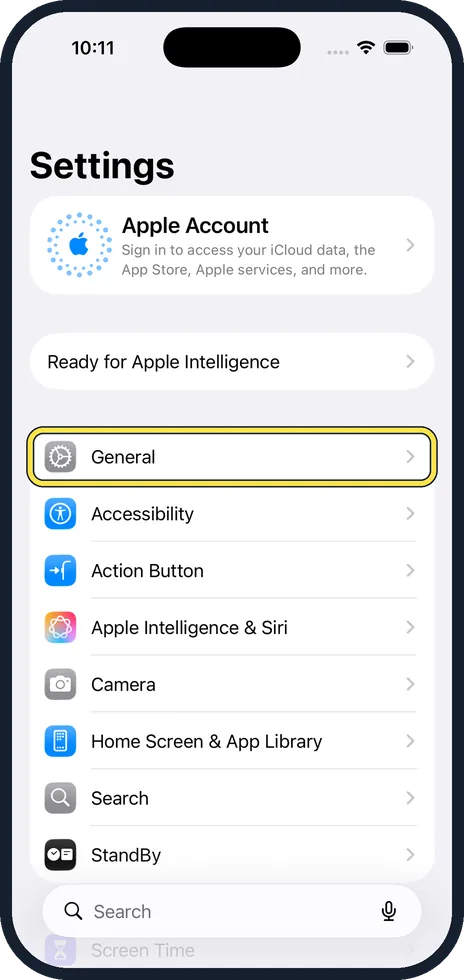
The picture is from iOS 26 on an iPhone 17. On older versions the rows are in the same place, with a slightly different look.
Step by step
Choose CarPlay on the car's display
Some cars do not switch to CarPlay by themselves. Look for the CarPlay logo on the car's screen and select it.
Check that Siri is on
CarPlay does not work without Siri. On the iPhone, open Settings and look under Siri (Apple Intelligence & Siri on newer versions). See how to use Siri on an iPhone.
Restart the iPhone and the car
Switch both off and on again. For the car, that means switching off the ignition and opening the driver's door on many models, so that the screen really shuts down.
Wired: try another cable and port
Use a different USB cable, if possible an original one, and a different USB port in the car. Some ports only charge. The right one is often marked with a CarPlay or phone symbol.
Wireless: switch on Bluetooth and Wi-Fi
Open Settings, Bluetooth and switch it on. Open Settings, Wi-Fi, tap the CarPlay network of the car and make sure Auto-Join is on.
Check Screen Time
Open Settings, Screen Time, Content & Privacy Restrictions, Allowed Apps and make sure CarPlay is allowed.
Forget the car and set it up again
Open Settings, tap General, then CarPlay. Tap your car and tap Forget This Car. Then connect the iPhone again and follow the set-up on the screen.
Update the iPhone and the car
Install the latest iOS: how to update an iPhone. Check the car manual for how to update the car's own software. A dealer can do this as well.
Good to know
CarPlay is not offered in every country, and not every car has it. The car maker's website lists the models and years.
With a USB-C to Lightning adapter between cable and phone, CarPlay can fail in some cars. Connect directly with one cable for the test.
If the iPhone does not charge on the car's cable either, the cable or the port is faulty: iPhone not charging: 8 fixes to try in order.
In short: CarPlay logo, Siri on, restart both, other cable and port, Bluetooth and Wi-Fi, Screen Time, Forget This Car, update.
- Apple Support: If you need help with CarPlay
Rules and prices change. Check the official source before you act.