iPhone iCloud backup failed? 7 fixes to try
2 min read · 7 steps · Updated 2 October 2026
Open Settings, tap your name, then iCloud, and look at the storage bar. If iCloud is full, tap Storage, then Backups, then your iPhone, and reduce the backup or buy more space. If there is room, connect to Wi-Fi, update iOS and try the backup on another Wi-Fi network.
The iPhone shows one of two messages when a backup fails: that there is not enough iCloud storage, or that the last backup could not be completed. The first is about space, the second about the connection.
The pictures are from iOS 26 on an iPhone 17. On older versions the rows are in the same place, with a slightly different look.
Step by step
See how much iCloud storage is left
Open Settings and tap your name at the top, then iCloud. The bar at the top shows how much of your storage is used.
Check the size of the next backup
Tap Storage (on some versions Manage Account Storage), then Backups, then the name of your iPhone. Next Backup Size shows how much room the backup needs. The number can take a few minutes to appear.
Make the backup smaller or buy space
On the same page, switch off apps whose data you do not need in the backup, and delete backups of devices you no longer own. If that is not enough, upgrade to a larger iCloud+ plan.
Check the Wi-Fi connection
For the message that the last backup could not be completed, open Settings and tap Wi-Fi. Make sure the iPhone is connected. An iCloud backup also needs a reasonable upload speed.
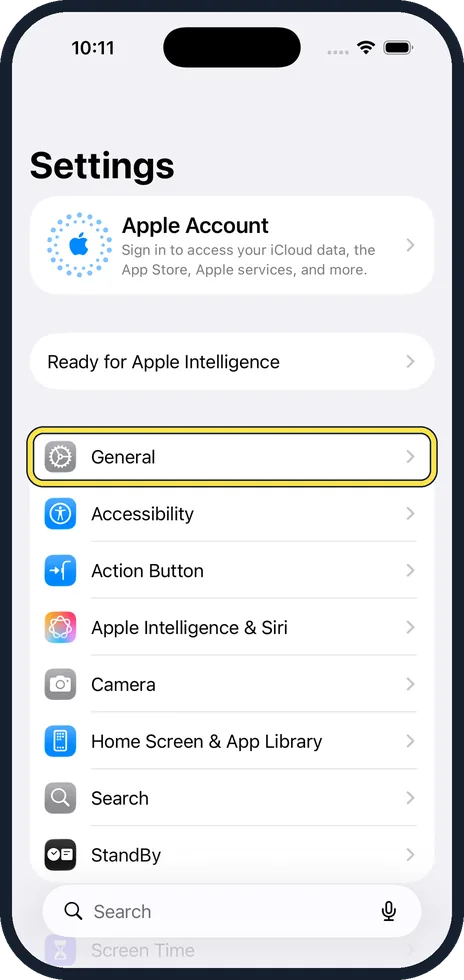
Update iOS
Open Settings, tap General, then Software Update, and install any update.
Try another Wi-Fi network
Apple's next step is to try the backup on a different Wi-Fi network, for example at work or at a friend's home.
Leave it for 24 hours
If the backup takes longer than expected, leave the iPhone connected to power and Wi-Fi for 24 hours. If it has still not finished, save your important data another way and repeat the steps.
Good to know
If the iCloud Backup switch is grey, a restore may still be running. Wait until it has finished. A profile from an employer or school can also block backups. Look under Settings, General, VPN & Device Management.
Automatic backups normally run when the iPhone is locked, charging and connected to Wi-Fi. A phone that is rarely charged near Wi-Fi rarely backs up.
A backup on a computer needs no iCloud storage: how to back up an iPhone to a Mac or PC.
How the backup is set up: how to back up an iPhone to iCloud.
In short: Check iCloud storage, shrink the backup or buy space, Wi-Fi, update, another network, 24 hours on power.
- Apple Support: If you can't back up to iCloud
Rules and prices change. Check the official source before you act.