How to use Double Tap on an Apple Watch
2 min read · 6 steps · Updated 2 October 2026
Raise your wrist so the screen is on, then tap your index finger and thumb together twice. The watch performs the main action on the screen, such as answering a call, pausing music or scrolling the Smart Stack.
Double Tap lets you control the watch with the hand that wears it, without touching the screen. That helps when the other hand is full. It is available on newer models only. Apple lists the supported models on its support site.
These steps are for recent versions of watchOS. The pictures are either our own screenshots from Apple's watchOS 26 simulator or simplified diagrams of the watch screen.
Step by step
Wake the watch
Raise your wrist. Double Tap does not work while the display is off.
Tap index finger and thumb together twice
Use the hand that wears the watch. Tap quickly, twice.
See what happens
The watch performs the main action of the screen. It answers a call, opens a reply to a message, pauses a timer or stops an alarm. On the watch face it opens the Smart Stack.
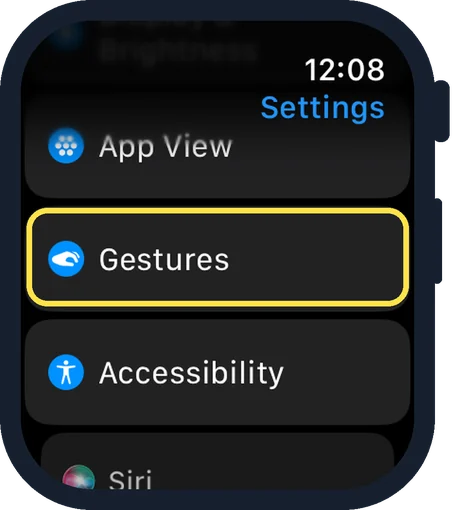
Open Settings and tap Gestures
Press the Digital Crown, tap the Settings gear and scroll down to Gestures.
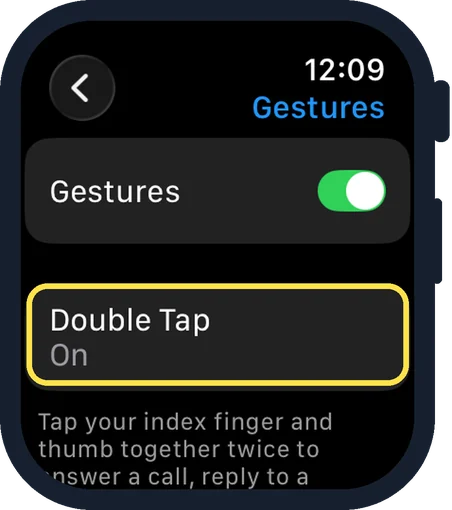
Tap Double Tap
The Gestures page has a main switch and a line for Double Tap. Tap Double Tap.
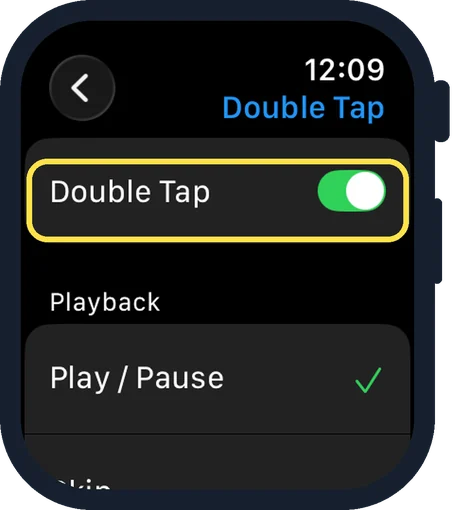
Choose what it does
The switch at the top turns Double Tap on or off. Under Playback, choose Play/Pause or Skip.
Good to know
Further down the same page, under Smart Stack, choose Advance or Select.
Double Tap does not work in Low Power Mode, while Sleep Focus is on, while the watch is locked, or on a watch that was set up for a family member.
It can also be blocked by certain accessibility hand gestures. Check Settings, Accessibility if it does nothing.
To switch it off, open Settings, Gestures, Double Tap and turn off the Double Tap switch at the top.
The same settings are in the Watch app on the iPhone under My Watch, Gestures.
In short: Screen on, tap index finger and thumb together twice. Settings, Gestures, Double Tap to adjust.
- Apple Support: Use tap gestures on Apple Watch
Rules and prices change. Check the official source before you act.